A calendar time audit is a review of what your calendar says you did over the past few weeks, set against what you say matters. You export or scroll back through four to eight weeks, sort every block into a handful of categories, add up the hours, and compare the...
TL;DR A goal only becomes real when it has a date, a duration and a place on the calendar. Recurring blocks are one of the simplest ways to do this. Structure goals in layers: one or two main missions, projects that act as milestones, and daily actions. Plan, then...
Use a list when your tasks are short, independent and mostly done in one sitting. Use a Kanban board when work passes through stages, when several things are in progress at once, or when you keep losing track of what is stuck. Most people need both: a list for...
Use a calendar for anything that happens at a specific time, and a to-do list for anything that only needs to happen eventually. Most people get stuck when they ask one tool to do the other’s job. A list can’t tell you whether Tuesday has room for a task, and a...
Mood and energy tracking means logging, a few times a day, how you feel and how much fuel you have, then reading the entries for patterns. Do it in 10 to 20 seconds per entry, 3 to 4 times a day, for two weeks. Add one line of context (what you were doing), and you...
A good personal dashboard is one screen that answers the few questions you ask yourself every day: What is next? Am I on track? What needs me right now? You set it up by choosing 4 to 6 widgets, arranging them in four zones, and deleting everything that does not earn...
Daily metrics tracking means watching a few current, high-frequency numbers that warn you early and let you correct course. Start by choosing a key performance question, then pick a small set of daily measures that answer it, such as time on priority tasks, completed...
Design daily boundaries, protect deep work, and run weekly reviews: that combination does more for sustainable balance than any single trick. Expect steadier energy and less burnout drift once boundaries are in place, and you can start today by picking one boundary (a...
Use time blocking for sustained deep work on a single project, and use task batching to group shallow, repeatable tasks into one focused session. Both methods solve the same underlying problem, which is constant context switching, but they solve it differently, and...
Open a dedicated business bank account and route every bit of business income there, right from the start. Pair it with a business credit card and standalone bookkeeping, and pay yourself through documented draws or payroll instead of pulling cash whenever you need...
Weekly Planning Routine: A 20-Minute Ritual That Sticks
A weekly planning routine that actually works comes down to three moves: reflect on last week, gather everything competing for your attention, then plan your top priorities into real time slots. Do it in that order and the whole thing takes 20 to 30 minutes for a standard session. People who write their weekly plans down are about 42% more likely to hit their goals than people who just keep a mental list, and a study of over 600 professionals found weekly planners ran 2.3 times more productive than people planning day by day.
Here’s the version you can run this week, no app required yet:
Reflect (5 minutes): What finished, what rolled over, what surprised you.
Gather (5 to 10 minutes): Pull tasks from your inbox, calendar, and any project notes into one list.
Plan (10 to 15 minutes): Pick 1 to 3 outcomes for the week and put them on the calendar as time blocks.
Protect (ongoing): Leave roughly 20% of your week unscheduled for the stuff you can’t predict.
Session length flexes with how deep you want to go. A quick check-in runs 15 minutes. A standard Sunday-night or Monday-morning session runs 20 to 30. A deep monthly-adjacent reset, where you’re also reviewing goals, can stretch to 60. The recommended range across most planning frameworks is 15 to 60 minutes, and the return on that time is disproportionate: a focused 20-minute ritual can save you hours of midweek decision fatigue.
Key Takeaways
A repeatable weekly planning routine works because it forces reflection, complete input gathering, and realistic scheduling into one short session instead of leaving your week to chance.
Point
Details
Set a fixed planning slot
Pick Sunday evening, Friday afternoon, or Monday morning and protect it with a recurring calendar invite.
Pick 1 to 3 outcomes only
Score candidates by impact, deadline, and effort, then move everything else to a later list.
Leave 20% of your week open
Buffer time absorbs the meeting that runs long or the client fire that wasn’t on the plan.
Run a five-minute midweek reset
Re-pick priorities from what’s left and drop the rest without guilt when plans break.
Keep one home for tasks and goals
Tools like LifeDesk centralize weekly priorities, calendar blocks, and goals so nothing gets tracked in three places at once.
What Should a Weekly Planning Routine Include First?
Reflection comes first, and its job is narrow: produce a short, honest list of what actually happened last week, not a performance review. You’re extracting three things: unfinished work that needs to roll over, lessons about what blocked you, and a read on your energy so next week’s plan doesn’t repeat the same overcommitment.
Ask yourself four questions and write down the answers, don’t just think them:
What did I actually finish, versus what I planned to finish?
What’s rolling over, and why didn’t it get done?
Where did I get blocked, and was that blocker something I control?
When did I have the most energy, and what was I doing during that window?
A micro-reflection covers just the first two questions and takes about two minutes. A deeper reflection, worth doing every few weeks, adds a fifth question: what surprised me? Surprises are data. If a client call ran twice as long as expected three weeks running, that’s not bad luck, that’s a scheduling assumption you need to fix.
Pro Tip:Treat this like a status report, not a report card. The goal is information you can act on, not a reason to feel behind. If you find yourself writing “I failed to…” instead of “this didn’t happen because…”, you’re doing morale damage instead of collecting evidence.
Where Do You Gather Everything for the Week?
Gathering has one job: get every task, commitment, and half-formed obligation out of your head and inboxes and into a single trusted list. If gathering is incomplete, your plan looks organized but misses the thing that actually blows up your Wednesday.
Pull from every place commitments hide:
Email flags and starred messages — anything you marked “deal with later.”
Calendar events already on the books — meetings, appointments, recurring calls.
Project next actions — the specific next step on anything mid-flight, not the whole project.
Notes and voice memos — ideas or requests you jotted down but haven’t processed.
Recurring commitments — bills, check-ins, workouts, anything on autopilot that still needs a slot.
The transfer rule is simple: if it takes less than two minutes, do it now instead of adding it to the list. Everything else gets one line in your planner or task system, tagged by where it belongs, work, personal, or admin, and roughly how long it’ll take. A five-step routine of reflecting, capturing everything, choosing priorities, timeboxing them, and leaving slack is what keeps plans from falling apart by Tuesday, and gathering is the step most people rush. Give it the full five to ten minutes.
If you’re juggling client work and internal projects, deciding where each item lives matters more than it sounds. A CRM versus project management framework helps separate client-facing next actions from internal project tasks so they don’t blur together in one messy list.
How Do You Pick and Schedule Your Weekly Priorities?
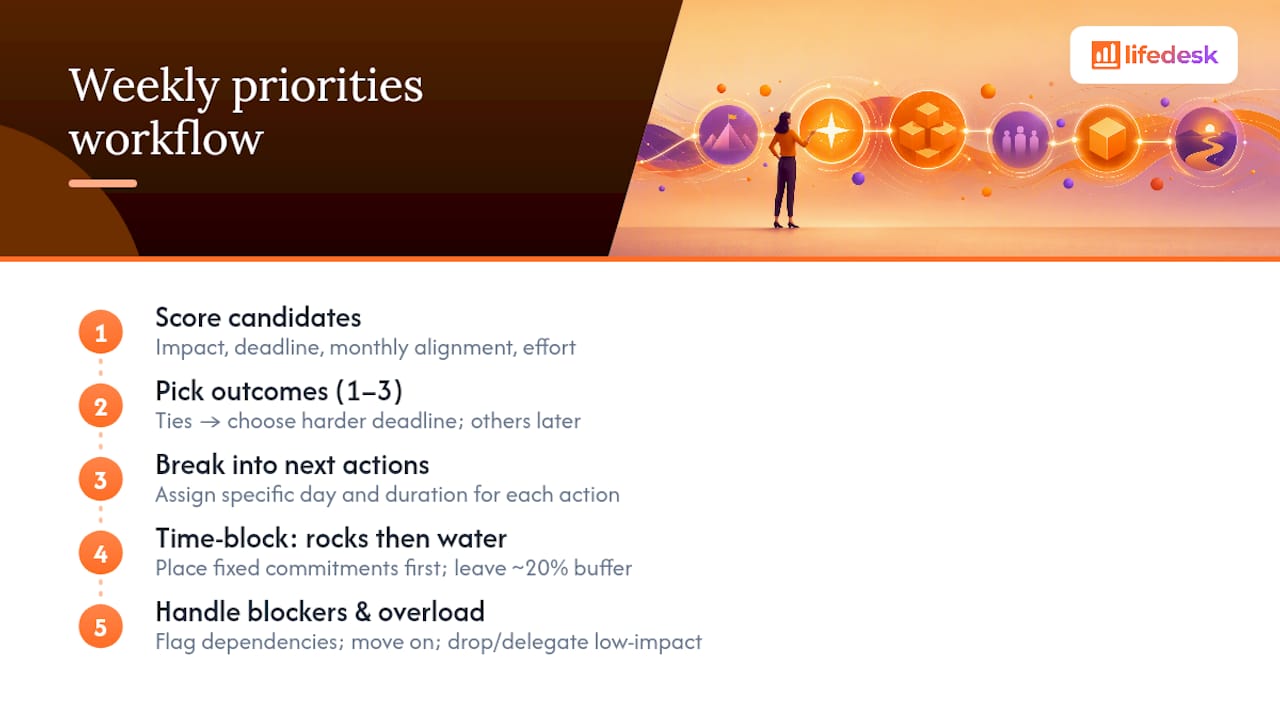
Choose 1 to 3 outcomes for the week, not a to-do list of fifteen tasks. An outcome is something like “send the Henderson proposal” or “finish the Q2 budget draft,” not a vague intention like “make progress on marketing.”
Score each candidate against four things: impact (does this move a real goal forward), deadline pressure, alignment with anything you committed to this month, and rough effort. If two items tie, pick the one with a harder deadline. Anything that doesn’t clear this bar goes back on a “later” list, it’s not gone, it’s just not this week’s fight.
Once you’ve picked your outcomes, break each one into next actions and assign them to specific days. “Send the Henderson proposal” becomes: Monday, draft outline (45 minutes); Tuesday, write full draft (90 minutes); Wednesday, review and send (30 minutes). Vague priorities stay vague until you force them into a day and a duration.
Time-blocking works best when you follow what one planning framework calls “rocks and water”: put your fixed commitments (meetings, appointments, deadlines) on the calendar first, since those are rocks that don’t move. Then pour your flexible tasks, the water, into what’s left. Deep work belongs in your highest-energy window, whatever that is for you, and meetings cluster wherever they naturally fall. Leave about 20% of your week unscheduled as buffer. That slack is what absorbs the meeting that runs long or the client email that turns into an hour-long fire.
When a dependency shows up, something you can’t start until someone else finishes their part, flag it and move to the next task rather than blocking your whole day on it. And when you’ve clearly overcommitted, the fix isn’t to work longer hours, it’s to drop or delegate the lowest-impact item on your list before the week starts, not after you’re already behind.
When Is the Best Time to Plan Your Week?
Sunday evening and Monday morning are the two most common slots, and each solves a different problem. Sunday evening planning means you walk into Monday with a plan already made, which cuts the “what do I even do today” drag. Monday morning planning works better if weekends genuinely need to stay work-free, since you’re reacting to a fresher read of what actually landed over the weekend. Friday afternoon is a solid third option for anyone who wants to close the week deliberately and start Monday with a plan already waiting.
The right slot depends less on productivity theory and more on which one you’ll actually protect. Here’s how that tends to break down by work pattern:
Work Pattern
Suggested Day/Time
Suggested Duration
Freelancer / self-employed
Sunday evening or Friday afternoon
30–45 minutes
Standard full-time employee
Monday morning, first 20 minutes at your desk
15–20 minutes
Shift worker (rotating schedule)
Start of first shift in the new cycle
20–30 minutes
Parent or caregiver with fragmented time
Sunday evening after kids are asleep
20–30 minutes
A freelancer juggling three clients gets more value from a longer Sunday session because their week has no fixed shape to anchor against, they’re building the shape from scratch. A shift worker rotating between days and nights needs to plan at the start of each new cycle rather than on a fixed weekday, since “Sunday” doesn’t mean the same thing to their schedule every week. The trade-off is consistency versus depth: a shorter, more frequent slot you’ll actually keep beats a longer one you skip half the time.
What Weekly Planner Layout Works Best for You?
Your layout should match how you think, not the other way around. Four formats cover almost every work style, and picking the wrong one is often why a planning habit quietly dies after three weeks.
Overview grid: A seven-day, low-detail view showing only your top priorities per day. Best for people juggling multiple contexts, like a freelancer bouncing between three clients, who need to see the whole week’s shape at a glance.
Time-blocked day-by-day: Each day gets its own hour-by-hour schedule. Best for deep-focus work where protecting specific hours matters more than seeing the whole week.
Task-first list: A single running list, roughly prioritized, with no time assignments. Best for checklist-driven weeks where flexibility matters more than structure, think support roles or reactive jobs.
Hybrid: Rocks (fixed commitments) go on a time-blocked calendar; water (flexible tasks) lives on a simple daily list. Best for most people, since it protects deadlines without forcing every minute into a box.
A minimal overview template looks like this: seven rows, one per day, each with a single line for “top outcome” and a second line for “one supporting task.” A time-blocked template needs hour markers down the left side and colored blocks for deep work, meetings, and admin. A task-first list just needs three sections: today, this week, waiting on someone else. Copy whichever matches your week and adjust after two tries, not zero.
If you’re deciding how to hold all of this in one place instead of scattering it across sticky notes and three different apps, a dedicated home for tasks and goals keeps the weekly plan visible alongside everything else competing for your time.
How Do You Keep a Weekly Planning Routine From Falling Apart?
The habit dies for predictable reasons: no fixed time slot, too many tools, over-scheduling every minute, and no way to recover when the week goes sideways. Fix those four things and the routine tends to hold.
Do:
Plan at the same time every week, even if it’s imperfect that week.
Keep one single source of truth for tasks, not three overlapping lists.
Build in a five-minute midweek check to catch drift early.
Automate recurring calendar invites for your planning slot itself using workflow automation to remove friction and maintain your routine.
Don’t:
Schedule every minute of every day, leave the 20% buffer.
Skip reflection because “nothing changed,” reflection is often fastest when the week was routine.
Treat a missed planning session as a reason to quit the habit entirely.
Rebuild your system from scratch every few weeks instead of tweaking one thing.
An accountability partner, even a casual one you text your top 3 priorities to each Monday, adds just enough social pressure to keep the ritual from sliding. A calendar invite that repeats automatically removes the “did I forget” friction entirely. If your planning tool has AI features, a quick prompt like “summarize what rolled over from last week” can shrink the reflection step from ten minutes to three, which matters most on the weeks you’re tempted to skip it altogether. LifeDesk’s AI assistant can pull that kind of summary automatically from your existing tasks and calendar instead of you reconstructing it by memory.
When the week actually breaks, and it will, a five-minute midweek reset is the fix: reassess what’s actually left, re-pick one or two priorities from what remains, re-slot them into the days left in the week, and drop the rest without guilt. That last part matters. Guilt about dropped tasks is what makes people abandon the whole system instead of just adjusting it.
Copy This Weekly Planning Template
This template covers four things every week needs: your priorities, your time blocks, your admin slots, and deliberate recovery time. Pick the quick or deep version depending on how much time you’ve got.
Field
Quick Variant (15–20 min)
Deep Variant (45–60 min)
Reflection
One line: what rolled over from last week
Four questions: finished, rolled over, blocked, surprised
Top priorities
1–2 outcomes, one line each
Up to 3 outcomes with impact/deadline notes
Time blocks
Rough day assignment (Mon: proposal, Wed: review)
Hour-by-hour blocks with buffer zones marked
Admin slot
One 30-minute catch-all block
Two 30-minute blocks, early and late week
Recovery time
Not tracked
One evening or half-day marked as fully open
A sample quick entry might read: “Priority 1: Send Henderson proposal, Tuesday. Priority 2: Finish budget draft, Thursday. Admin: Friday 2 to 2:30pm.” A deep entry adds the reflection questions on paper and breaks the proposal into three sub-tasks across three days instead of one line.
Run through this checklist during the session itself, in order:
Reflect: what finished, what rolled over, what surprised you.
Gather: pull tasks from email, calendar, and notes into one list.
Choose priorities: pick 1 to 3 outcomes for the week.
Schedule: assign each priority to specific days and time blocks.
Protect buffers: leave roughly 20% of the week open.
Commit: write down the very first action you’ll take Monday morning.
That last step matters more than it looks. A concrete first action removes the Monday-morning question of where to even start, which is half the checklist most professionals already rely on for getting a week moving without friction.
A solid weekly planner includes a reflection on the prior week, a complete list of gathered tasks and commitments, 1 to 3 chosen priorities, time blocks for those priorities, and a buffer of unscheduled time for the unexpected.
What is a good weekly planner?
A good weekly planner is one you’ll actually keep using, whether that’s a paper grid, a time-blocked calendar, or an app like LifeDesk that keeps tasks, goals, and calendar in one place instead of scattered across separate tools.
How do you structure a weekly planner?
Structure it around three stages: reflect on last week for five minutes, gather every task and commitment into one list, then plan by choosing priorities and time-blocking them, leaving roughly 20% of the week as buffer.
What’s the best layout for a weekly schedule?
The best layout depends on your work style: an overview grid suits people juggling multiple contexts, time-blocked days suit deep-focus work, a task-first list suits checklist-driven weeks, and a hybrid of both suits most people.
How long should weekly planning take?
A quick session takes about 15 minutes, a standard session runs 20 to 30 minutes, and a deeper monthly-adjacent review can take up to an hour.