A recurring task is any piece of work that comes back on a pattern: the weekly invoice run, the Tuesday workout, the monthly tax set-aside, a client’s birthday. The best way to manage them is to decide two things for each one: what triggers the next copy (the calendar...
A life operating system (often shortened to Life OS) is one connected setup where your goals, projects, tasks, calendar, notes, money and habits live together and inform each other. A to-do list only stores actions. A life OS also tells you why those actions matter...
The most reliable way to plan work and personal life together is to stop splitting them. Write every commitment into one inventory, put it on one calendar, rank it by importance and urgency, give it a block of time, and review the plan weekly. The rest of this guide...
A calendar time audit is a review of what your calendar says you did over the past few weeks, set against what you say matters. You export or scroll back through four to eight weeks, sort every block into a handful of categories, add up the hours, and compare the...
TL;DR A goal only becomes real when it has a date, a duration and a place on the calendar. Recurring blocks are one of the simplest ways to do this. Structure goals in layers: one or two main missions, projects that act as milestones, and daily actions. Plan, then...
Use a list when your tasks are short, independent and mostly done in one sitting. Use a Kanban board when work passes through stages, when several things are in progress at once, or when you keep losing track of what is stuck. Most people need both: a list for...
Use a calendar for anything that happens at a specific time, and a to-do list for anything that only needs to happen eventually. Most people get stuck when they ask one tool to do the other’s job. A list can’t tell you whether Tuesday has room for a task, and a...
Mood and energy tracking means logging, a few times a day, how you feel and how much fuel you have, then reading the entries for patterns. Do it in 10 to 20 seconds per entry, 3 to 4 times a day, for two weeks. Add one line of context (what you were doing), and you...
A good personal dashboard is one screen that answers the few questions you ask yourself every day: What is next? Am I on track? What needs me right now? You set it up by choosing 4 to 6 widgets, arranging them in four zones, and deleting everything that does not earn...
Daily metrics tracking means watching a few current, high-frequency numbers that warn you early and let you correct course. Start by choosing a key performance question, then pick a small set of daily measures that answer it, such as time on priority tasks, completed...
A Life Management System: Your First Move This Week
A life management system is a compact loop: capture what hits you, prioritize it, schedule it, and review it on a set cadence. That’s the whole mechanism. Everything else, from Pomodoro timers to color-coded calendars, just fills in the loop.
Monitoring: habits, notes, and the review cycle you build in later
Skip any one layer and the whole thing tends to wobble within a month.
How Do You Diagnose Your Biggest Time Management Problem?
Before touching a single app, spend 3 to 7 days tracking three things: what you worked on, how long it took, and how you felt doing it (energized, dragging, distracted). Productivity experts recommend running this kind of time audit first and identifying your single most painful problem before choosing anything else.
Once you have a week of data, read it for a pattern:
You have too many priorities and no way to rank them. That’s a prioritization problem, and the fix is the Eisenhower Matrix, which sorts tasks by urgency and importance.
You know what to do but can’t start. That’s an activation problem, and the Pomodoro Technique (25 minutes of focused work, 5 minute break) usually breaks the freeze.
Your day gets eaten by other people’s requests. That’s a scheduling problem, solved by time blocking, where you put the work on the calendar as if it were a meeting.
You have a backlog of loose commitments and half-finished projects. That’s a capture and process problem, and David Allen’s Getting Things Done (GTD) method is built for exactly this.
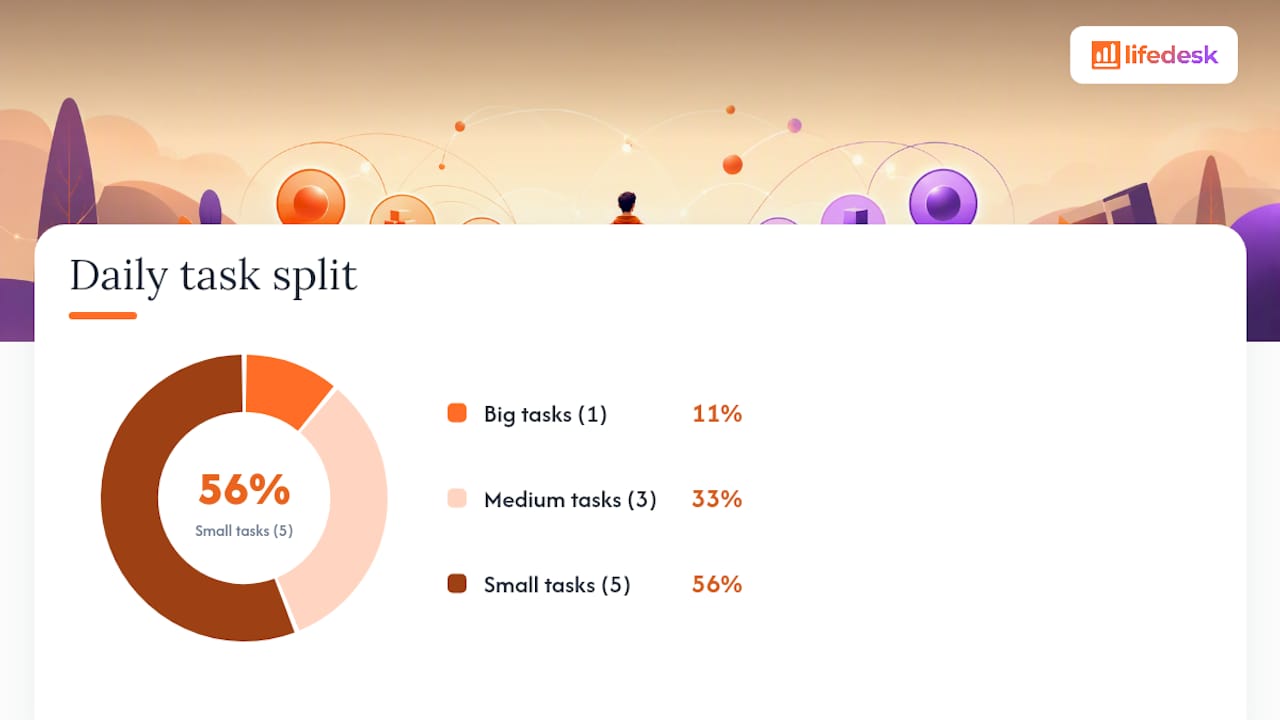
You finish tasks but never feel like you’re moving forward. That’s a focus problem, fixed by the 1/3/5 rule: one big task, three medium tasks, five small tasks per day, no more.
Run whichever technique fits for one week and track a single number, like total focus hours logged. If that number improves, keep it. If it doesn’t move, a compact one-week test with one clear metric tells you fast enough to try something else.
Pro Tip:Don’t stack three techniques at once to solve one problem. Pick one method per layer, prioritization, scheduling, execution, since piling on similar tools tends to create more overhead than clarity.
What’s a Simple Template for Building Your System Today?
You don’t need software to start. A notebook, a free calendar app, or a tool like Notion all work, as long as you follow the same four-step loop: capture, process, schedule, review.
Setup steps:
Create one inbox (a note app, a physical notebook, whatever you’ll actually check daily).
Every morning, sort yesterday’s captures into three lists: Today, Soon, and Someday.
Build your Today list using the 1/3/5 rule.
Block calendar time for your one big task before anything else fills the day.
Run a 15 minute weekly review every Friday or Sunday.
Check goal milestones once a month.
Sample daily workflow: Block 90 minutes for your one big task, broken into three Pomodoro sessions with 5 minute breaks. Handle your three medium tasks in the afternoon, one 25 minute block each. Squeeze the five small tasks into gaps between meetings.
Weekly review checklist:
Clear the inbox to zero
Move unfinished items from Today to tomorrow or Soon
Check one habit streak
Glance at one metric (focus hours, tasks completed, whatever you’re tracking)
For freelancers juggling client work and personal admin, protecting billable hours with the same time blocking approach keeps paid work from bleeding into unpaid hours.
How Do You Keep a Life Management System From Falling Apart?
Systems die from neglect, not bad design. A weekly review, ideally the same 15 to 20 minutes every Friday, is what keeps the loop from silently breaking.
Track a small number of metrics instead of a dozen:
Focus hours versus meeting hours (are you protecting deep work?)
Habit streak length (are your routines sticking?)
Task completion rate (are you finishing what you plan, or just moving things forward endlessly?)
Weekly reviews and simple measurement create the feedback loop that separates a real strategy from a wish. When a technique stops working, swap it rather than forcing it. Time management runs on executive function, and keeping a menu of strategies and switching when one stalls matters even more for neurodivergent users who deal with time blindness.
Common failure: the review gets skipped for two weeks and the inbox balloons. Fix: shrink the review to five minutes rather than skip it entirely.
How Can LifeDesk Support Your Life Management System?
Every component from the sections above needs a home, and most people end up spreading them across five or six disconnected apps. LifeDesk puts capture, tasks, goals, calendar, finances, health, habits, and a built-in AI assistant in one place, which removes the constant app-switching that quietly drains focus.
Capture lands in one inbox, then gets sorted into tasks or projects without opening a second app.
Goals link directly to the tasks and calendar blocks that move them forward.
Habit and health tracking sit next to your task list, so connecting energy patterns to your schedule takes a glance instead of cross-referencing two apps.
The AI assistant can draft your weekly review summary from logged tasks and time entries, cutting that Friday ritual down to a few minutes.
Finances, including real bank account connections, sit in the same dashboard as your goals, so a savings target and a task list aren’t managed separately.
Layer
Where it lives in LifeDesk
Capture
Central inbox across web, iOS, and Android
Scheduling
Integrated calendar with task and goal links
Review
AI assistant summaries plus manual weekly check-ins
Ready to Build Your System This Week
You don’t need to migrate your whole life into a new app on day one. Start with three moves: set up one capture inbox, connect your calendar, and create a single goal you actually care about. That alone gets the core loop running.
The features that pay off fastest in week one are the calendar sync, the task-to-goal linking, and the AI assistant, since it can turn your first week of logged time into a rough draft of your own time audit. Compared to stitching together a separate task app, calendar, habit tracker, and finance spreadsheet, running all four in one connected platform means your weekly review pulls from a single source instead of four browser tabs.
If you want to see the pieces before committing, the quick tools page has timers and trackers you can use without setting up a full account. When you’re ready to link tasks, goals, and habits properly, start on the features page and enable the free tier first. No card required to try the core loop for a week.
The 3-3-3 rule has you spend 3 hours on your most important task, 3 hours on smaller urgent tasks, and 3 hours on maintenance work like email or chores. It’s a variant of the 1/3/5 rule, built for people who want fewer, bigger blocks instead of five small tasks.
What Is the Best Free App for Organizing My Life?
The best free option depends on whether you need one function (a calendar, a task list) or a connected system. LifeDesk offers a free tier that links tasks, goals, and calendar in one place, which avoids the sync gaps that come from combining several single-purpose free apps.
What Software Can I Use to Manage My Life?
Options range from single-purpose apps for tasks or habits to all-in-one platforms like LifeDesk that combine tasks, goals, calendar, finances, and health tracking. The right choice depends on whether you’re comfortable managing several separate tools or prefer one connected dashboard.
Can I Use AI to Organize My Life?
Yes. AI assistants can summarize your logged time into a rough time audit, draft weekly review notes, and flag overdue goals, though the output still needs a human check for accuracy before you act on it. LifeDesk’s built-in AI assistant handles the first two of those tasks directly inside your existing task and calendar data.