The most reliable way to plan work and personal life together is to stop splitting them. Write every commitment into one inventory, put it on one calendar, rank it by importance and urgency, give it a block of time, and review the plan weekly. The rest of this guide...
A calendar time audit is a review of what your calendar says you did over the past few weeks, set against what you say matters. You export or scroll back through four to eight weeks, sort every block into a handful of categories, add up the hours, and compare the...
TL;DR A goal only becomes real when it has a date, a duration and a place on the calendar. Recurring blocks are one of the simplest ways to do this. Structure goals in layers: one or two main missions, projects that act as milestones, and daily actions. Plan, then...
Use a list when your tasks are short, independent and mostly done in one sitting. Use a Kanban board when work passes through stages, when several things are in progress at once, or when you keep losing track of what is stuck. Most people need both: a list for...
Use a calendar for anything that happens at a specific time, and a to-do list for anything that only needs to happen eventually. Most people get stuck when they ask one tool to do the other’s job. A list can’t tell you whether Tuesday has room for a task, and a...
Mood and energy tracking means logging, a few times a day, how you feel and how much fuel you have, then reading the entries for patterns. Do it in 10 to 20 seconds per entry, 3 to 4 times a day, for two weeks. Add one line of context (what you were doing), and you...
A good personal dashboard is one screen that answers the few questions you ask yourself every day: What is next? Am I on track? What needs me right now? You set it up by choosing 4 to 6 widgets, arranging them in four zones, and deleting everything that does not earn...
Daily metrics tracking means watching a few current, high-frequency numbers that warn you early and let you correct course. Start by choosing a key performance question, then pick a small set of daily measures that answer it, such as time on priority tasks, completed...
Design daily boundaries, protect deep work, and run weekly reviews: that combination does more for sustainable balance than any single trick. Expect steadier energy and less burnout drift once boundaries are in place, and you can start today by picking one boundary (a...
Use time blocking for sustained deep work on a single project, and use task batching to group shallow, repeatable tasks into one focused session. Both methods solve the same underlying problem, which is constant context switching, but they solve it differently, and...
Life Operating System: How to Build One That Lasts
A life operating system (often shortened to Life OS) is one connected setup where your goals, projects, tasks, calendar, notes, money and habits live together and inform each other. A to-do list only stores actions. A life OS also tells you why those actions matter and what deserves your attention today. You can build one in a notebook, in a template, or in an all-in-one app. The tool matters less than three habits: capture everything in one place, review on a fixed schedule, and keep the structure small enough to maintain.
This guide explains what a life OS includes, how it differs from a pile of separate apps, how to build one step by step, and how to keep it from collapsing after the first enthusiastic month.
LifeDesk
Bring Your Life OS Into One App
LifeDesk brings tasks, goals, calendars, finances, health and business organization together, helping you structure personal and professional responsibilities in one place.
A life OS is an integrated framework that connects your values, goals and life areas to projects, tasks, habits, information and reviews.
It differs from a to-do list by supplying direction and context, and from separate apps by linking information across them.
Build it in order: list your life areas, set a few goals per area, turn them into projects and scheduled actions, then add a weekly review.
Most systems fail because of maintenance cost. Favor quick capture, fewer categories and a review you do on a schedule, not when you feel like it.
If you want it in one app, LifeDesk covers tasks, goals, calendar, finances, health and business work on web, iOS and Android, starting with a free plan.
The term comes from the idea that a computer’s operating system sits underneath every program and coordinates them. A personal version does the same for your responsibilities. One personal framework description defines it as a place for your key ideas, information and tasks, stored in the right spheres of life, with action items presented in an order of priority that suits you.
Three parts show up in almost every version:
Direction. Your values, long-term goals and the areas of life you want to keep healthy.
Execution. Projects, tasks, a calendar and habits that turn direction into daily action.
Reflection. Regular reviews that check whether the actions still point where you want to go.
That third part is easy to skip, and it is often what separates a system from a collection of lists. One productivity writer argues that a workable system has to support three activities: plan, do and reflect, and that a task list is only one tool inside that loop.
Life OS vs. a to-do list
A to-do list is a queue. Its success measure is that it gets shorter. A personal operating system works more like a radar: one builder describes it as situational awareness, so the important things are visible when they need attention rather than buried under 80 equally weighted items.
In practice the difference shows up on a bad day. A list tells you everything that is undone. A life OS tells you which three things matter, because it knows your deadlines, your goals and what is already on your calendar.
Life OS vs. a stack of separate apps
Many people already run a life OS by accident: tasks in one app, notes in another, a calendar, a budgeting tool, a habit tracker, a fitness log. Each works. The trouble is that none of them knows about the others. A deadline in your task app does not block time on your calendar, and a goal in your notes app never reaches your weekly plan.
An integrated system links calendars, tasks, notes and goals so they inform one another instead of becoming isolated silos. That is the real definition of the “OS” part: connection, not just collection.
Which areas of life a life OS can cover
There is no standard list, but the areas below come up most often. Pick the ones that carry real weight for you, and leave out the rest.
Area
What lives there
Typical review question
Work or business
Projects, clients, deadlines, time tracking
What moves revenue or reputation this week?
Money
Budget, accounts, net worth, invoices
Where did money actually go?
Health and fitness
Workouts, sleep, appointments, habits
What did I do for my body this week?
Relationships
Family, friends, follow-ups, birthdays
Who do I owe a call or a thank-you?
Learning
Courses, books, skills, notes
What am I getting better at?
Home and admin
Documents, renewals, errands
What expires or needs paperwork soon?
Hobbies and rest
Creative projects, trips, downtime
What did I do just for enjoyment?
Freelancers and solo business owners get extra value from a shared system, because personal and professional commitments compete for the same hours. A client call, a dentist appointment and a tax deadline all land on one calendar whether you like it or not.
How to build a life operating system, step by step
Goal-setting and habit research does not prescribe one universal design, but it does constrain a good one. A review of that research argues that a useful personal system should start from values you are genuinely committed to, convert intentions into context-specific actions, keep rituals simple enough to repeat, and include regular resets. The steps below follow that outline.
Step 1: Choose 5 to 8 life areas
Use the table above as a starting point. Fewer is better. Every area you add is another place to look, another set of tasks to maintain and another reason the system might feel heavy.
Step 2: Set one to three goals per area
Write each goal so you could tell, in a year, whether it happened. “Get healthier” is a direction. “Run three mornings a week and book a checkup” is something you can schedule. If an area has no goal right now, that is fine: it can simply hold maintenance tasks.
Step 3: Turn goals into projects and next actions
A project is anything that takes more than one step. For each goal, write the very next physical action and give it a place and time. Planning research on if-then plans is the reason to be specific here: tying an action to a situation (“Tuesday at 7:00, after coffee”) is more concrete than a vague intention. If you want a method for placing those actions on the calendar, our practical guide to time blocking walks through it, and the idea of scheduling work against your goals shows how plans become calendar entries.
Step 4: Decide where things get captured
Pick one inbox for everything: a quick note, a voice memo, a task entry. The point is to minimize the time between something happening and you recording it. Cognitive offloading research has a warning here: people tend to be optimistic about how reliably they have offloaded information, so the capture habit has to be fast and unified, or things slip.
This is the maintenance engine. Block 20 to 30 minutes at the same time each week and run the same checklist:
Empty your inbox into tasks, notes or the trash.
Look at next week’s calendar and confirm it reflects your goals.
Scan each life area for anything overdue or neglected.
Pick the three outcomes that would make the week a success.
A monthly or quarterly version of the same ritual lets you adjust goals instead of just ticking tasks.
Why external systems help, and why people still abandon them
Putting information outside your head is not a productivity fad. Studies of cognitive offloading show that tools such as reminders and lists help with remembering future intentions, and that people can learn to use them more strategically with practice and instruction. Related work reports that external memory aids such as smartphone alerts and to-do lists spare you the effort of storing and retrieving everything internally.
So the idea works. What fails is usually the upkeep. Organization apps can become stale when their structure demands too much maintenance, which is why quick capture and quick retrieval matter more than an elaborate setup. A beautiful dashboard with 14 databases that takes an hour to update will be abandoned by February.
Common failure patterns:
Over-building. Too many categories, tags and templates before you have used the system for a week.
Separate homes. Work in one place, life in another, with no shared calendar.
No review. Items pile up, trust drops, and you start keeping lists elsewhere.
Feeling-based maintenance. You review when you feel organized, which is exactly when you need it least.
How to keep your system simple
Decision fatigue makes complex systems harder to manage, so the guidance is to run reviews on a rigid schedule rather than on a feeling, so tasks are handled before they scatter. A schedule removes a decision. If a deadline-heavy period makes this hard, a campus-tested method for managing deadlines shows the same principle at work: a fixed review rhythm plus clear task prioritization.
A few rules that keep a life OS light:
Start with the minimum. Tasks, calendar and one weekly review. Add goals, habits and finances only when you want them.
Choose by what keeps getting lost. If you lose tasks, fix tasks first. If you lose files, fix storage first. Match the tool layer to the problem.
Prune quarterly. Delete areas, tags and projects you have not touched.
Make retrieval easy. If you cannot find something in under 30 seconds, you will stop saving things.
Templates, DIY setups or an all-in-one app?
There are three common ways to run a life OS, and each suits a different person.
Approach
Best for
Watch out for
Notebook or paper planner
People who think best by hand
Hard to search, no reminders
Template in a workspace tool
People who enjoy tinkering
Setup and upkeep become a hobby
All-in-one life management app
People who want it working today
Choose one that covers your real areas
What to look for in life management software
Whatever route you take, check these points before committing:
Tasks and calendar together, so a task can become a scheduled block. The tradeoff between the two is covered in calendar vs. to-do list.
Goals that connect to daily work, not a separate page you never open.
Habits and health tracking if those are among your areas.
Finances, ideally with connected accounts if you want less manual entry.
Device access on web and mobile, since capture happens on your phone.
Data portability and privacy. Some apps let you export your data and keep data on the device unless sync is on; for example, one habit tracker documents JSON export and local-only storage by default. Ask the same of any app you adopt.
Cost. Compare free tiers and what the paid tier unlocks, and whether pricing is monthly or yearly.
Running a life OS in LifeDesk
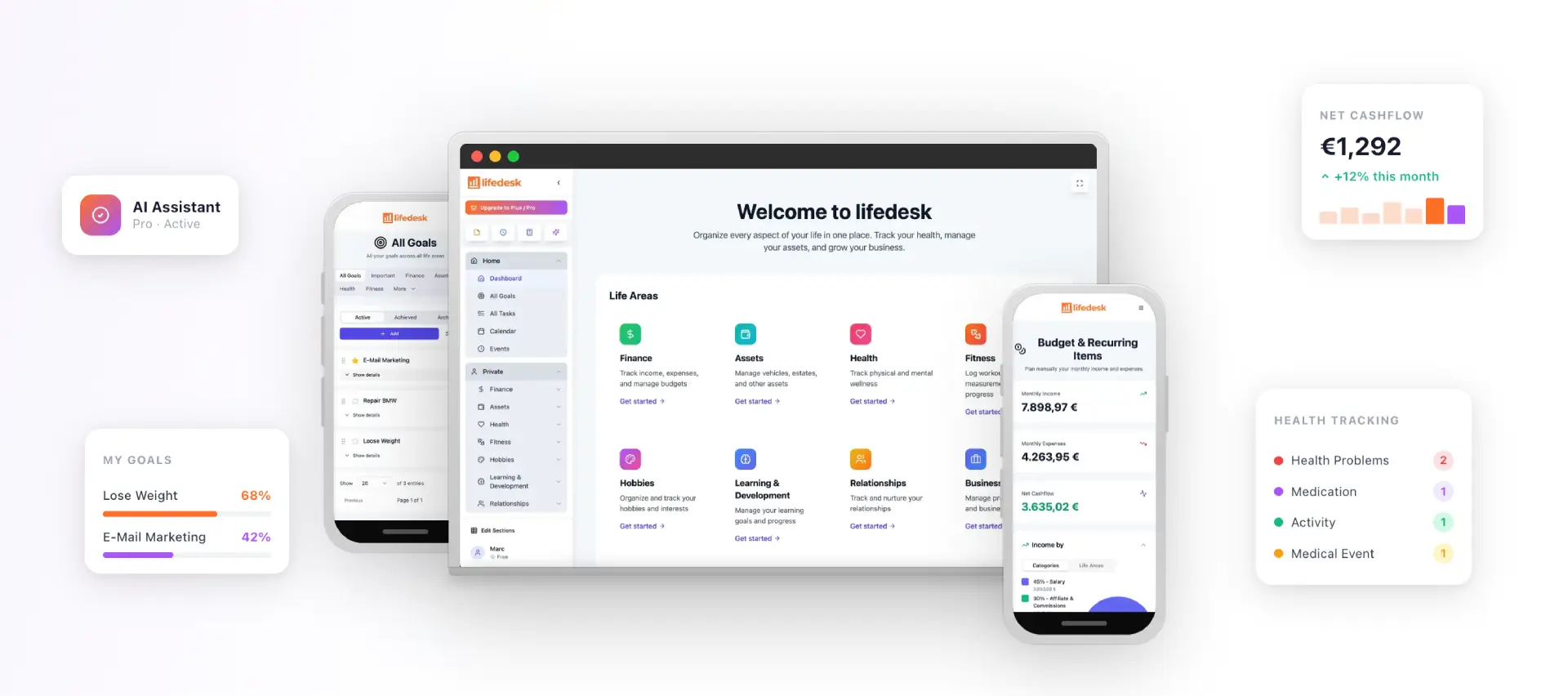
LifeDesk is built as an all-in-one platform for personal and business self-management. It brings tasks, goals, calendar, finances, health, fitness, relationships, learning, hobbies and business organization into one app for web, iOS and Android. Private and business areas have separate but accessible views, which suits freelancers and self-employed people who switch between roles all day.
Free: $0 per month, for basic life and work organization.
Plus: $9 per month.
Pro: $19 per month.
The paid plans unlock premium features such as bank account connections, higher limits and the AI assistant.
If you want to try the approach from this article without building anything first, start with the free LifeDesk plan and set up your life areas, one goal each, and a weekly review.
A few places the app maps directly onto the steps above:
Our own positioning is that LifeDesk can replace 5 to 10 separate apps for people who manage many responsibilities. Whether that fits you depends on which areas you actually use, which is why starting with the free plan and only a few areas is the sensible path.
A sample week in a working life OS
Here is how the pieces fit for a freelance designer who also trains for a half marathon and manages household finances.
Sunday, 25 minutes, weekly review. She clears her inbox into tasks, checks next week’s calendar against two goals (finish a client rebrand, run four times), and picks three outcomes: deliver the logo set, send two invoices, complete three runs.
Monday to Friday, daily glance. Each morning she opens a single view that shows today’s calendar blocks, the due tasks and a habit check. Runs sit on the calendar as appointments, not wishes. Client work is time-blocked in two-hour chunks.
Anytime, capture. A thought about a client email, a birthday gift idea and a bill she needs to pay all go to the same inbox on her phone in under ten seconds.
Month end, 15 extra minutes. She checks spending against the budget, prunes one project that stalled, and adjusts the next month’s goals.
Nothing here is complicated. The system works because every item has one home, every week has one review, and every goal appears on the calendar.
FAQ
What is the difference between a life OS and a personal management system?
The terms overlap heavily. “Personal management system” is the older, broader phrase for any method you use to run your commitments. “Life OS” usually implies one connected workspace that covers many life areas, not just work tasks.
Do I need a template or an app to build a life OS?
No. A notebook, a calendar and a weekly review already form a basic system. Apps and templates add search, reminders and links between items, which matter more as your commitments grow.
How long does it take to set up?
A minimal version takes an evening: list your life areas, write a goal for each, and schedule your first weekly review. Add finances, habits or business tracking later, one at a time, once the review habit holds.
Is an all-in-one life organizer better than separate apps?
It depends on how much you switch between areas. If you keep losing information between apps, a connected system helps because tasks, calendar and goals reference each other. LifeDesk is designed for people who want private and business management together in one app.