The fastest way to turn emails into tasks is to use your inbox’s built-in conversion feature (Outlook’s drag-to-Tasks or Gmail’s Tasks panel) for one-off items, and automation rules for anything that repeats. Manual capture works fine at low volume; once the same type...
A hobby project planner is a tool, template, or notebook system that helps you capture ideas and, more importantly, always know your single next physical action. Right now, pick one tool, however basic, and write down the very next step for your current project....
AI agents reclaim your schedule by auto-scheduling tasks, defending focus blocks, and resolving conflicts before you even notice them, but only when you keep human-in-the-loop controls turned on. The strongest results come from task-first tools that unify your to-do...
AI goal planning converts a single sentence of intent, like “I want to get fit” or “I want a promotion,” into a measurable SMART goal with milestones, weekly tasks, and deadlines already attached. Within minutes, you get a concrete plan for the next seven days plus...
Calendar finance integration works best when you match the method to the job: native iCal feeds or a calendar-first finance app for visibility, middleware like Zapier or IFTTT for quick pilots, and API plus webhooks for anything running in production. Most finance...
A life management system is a compact loop: capture what hits you, prioritize it, schedule it, and review it on a set cadence. That’s the whole mechanism. Everything else, from Pomodoro timers to color-coded calendars, just fills in the loop. The single best first...
The best marketing planner for freelancers fits on one page, ties to a single measurable outcome, and runs on a weekly rhythm with a fixed monthly review. That’s it. No 40-tab spreadsheet, no funnel diagram with seventeen boxes. Just one page: who you serve, what...
Start with a simple template that has defined fields, a 4 to 6 week working window, and one owner per item. Assign a status to every entry (idea, draft, review, scheduled, published) so nobody has to ask “where is this?” in a Slack thread. Your next move: open a...
Run this every morning: scan your calendar for two minutes, pick three Most Important Tasks (MITs), assign each one a rough time block, add a 15% buffer, then lock the plan and walk away. That is a complete daily planning routine, and it takes 5 to 10 minutes if you...
A weekly planning routine that actually works comes down to three moves: reflect on last week, gather everything competing for your attention, then plan your top priorities into real time slots. Do it in that order and the whole thing takes 20 to 30 minutes for a...
Time Blocking: A Practical Guide to Getting More Done
Time blocking is a calendar-first scheduling method that assigns specific tasks to fixed time slots, protecting your deep work from interruptions and helping you finish more in less time. Here’s a three-step quick-start you can run in under ten minutes:
Capture your tasks for tomorrow in a single list.
Block each task into your calendar as a named, timed event.
Protect those blocks by treating them like meetings you can’t cancel.
Follow this guide and you’ll leave each day with a realistic schedule, fewer overruns, and a clearer head.
What is time blocking, and how does it differ from a to-do list?
Time blocking is the practice of dividing your day into discrete chunks, each reserved for one specific task or category of work. Think of it as fusing your calendar with your to-do list: instead of a list of things to do “sometime today,” every task gets a named slot with a start and end time.
A to-do list tells you what to do. A time-blocked calendar tells you when you’ll do it, for how long, and what you’re not doing during that window. That shift from intention to commitment is what separates people who finish their lists from people who carry the same items forward for weeks.
Common block labels you can steal right now: Deep Work (writing, coding, analysis), Email & Comms (two fixed windows, not all day), Meetings, Admin, Buffer (intentional white space), and Personal (lunch, exercise, family). Label them clearly in your calendar so anyone who can see your schedule knows you’re unavailable.
Why does time blocking actually improve productivity?
The core mechanism is monotasking. When you assign one task to a finite window, you eliminate the cognitive cost of deciding what to work on next. Research on multitasking behavior shows that workers take an average of roughly 23 minutes to recover full focus after an interruption. A blocked schedule dramatically reduces how often those interruptions happen, because you’ve already made every decision about your day in advance.
Two other mechanisms do heavy lifting here. First, implementation intentions: the psychological research behind “I will do X at time Y in place Z” shows a medium-to-large effect on follow-through compared to vague goal-setting. Blocking a task in your calendar is exactly that kind of concrete commitment. Second, artificial deadlines: a block with a fixed end time creates a constraint that fights Parkinson’s Law, the tendency for work to expand to fill whatever time you give it.
The practical payoffs stack up quickly. Structured scheduling is linked to reduced decision fatigue, better task accuracy, and faster recovery from interruptions. You also get a more honest picture of your workload. Most people discover, on their first day of blocking, that they’ve been mentally scheduling much more work than fits into a standard 8-hour day.
How long should your blocks be? What the research says
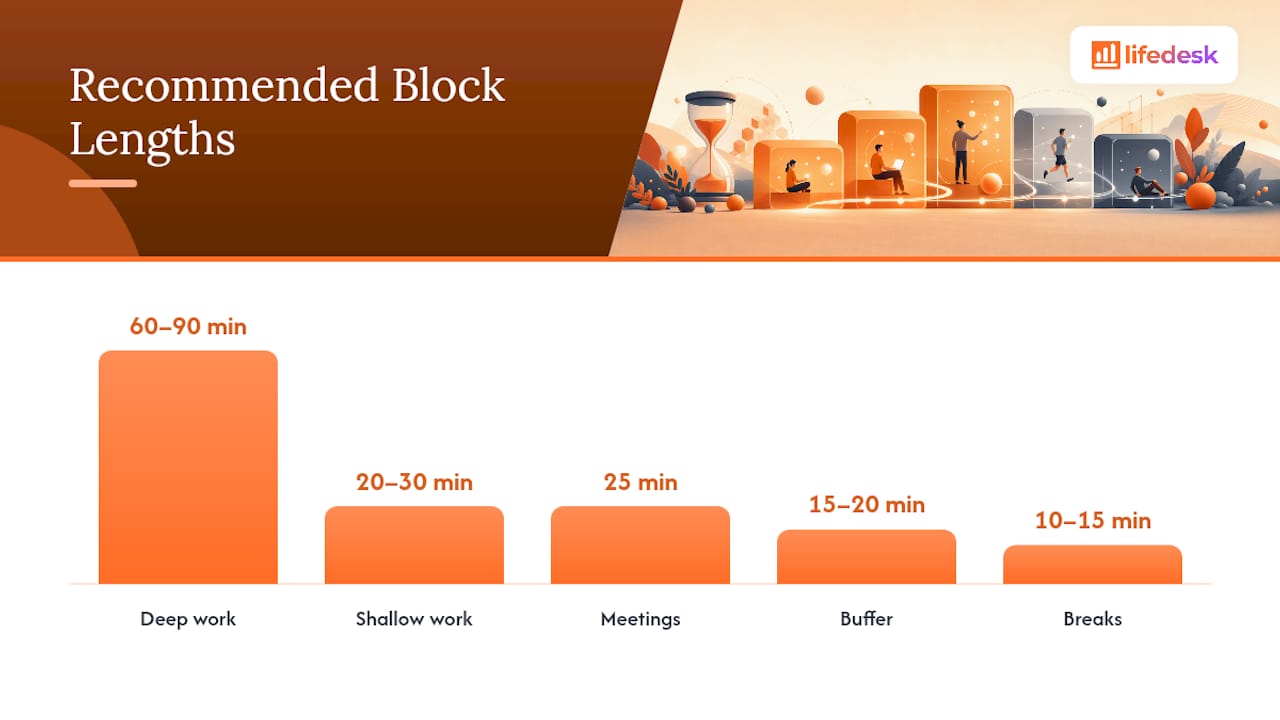
Cognitive fatigue research consistently points to a peak focus window of 60–90 minutes for demanding cognitive work. Beyond roughly two hours of sustained effort, decision-making quality drops and errors increase. That’s not a reason to work less; it’s a reason to build breaks into your plan before fatigue builds up.
Block type
Recommended length
Best use
Deep work
60–90 min
Writing, coding, strategic analysis
Shallow work
20–30 min
Email, Slack, quick admin tasks
Meetings
25 min
Use shorter defaults to build in transition time
Buffer
15–20 min
Between major blocks; absorbs overruns
Breaks
10–15 min
After each deep-work block
Adapting for ADHD and nonstandard schedules
Shorter blocks work better for many people with ADHD. A 25-minute focused window followed by a 5-minute break (the Pomodoro structure) often produces more output than a 90-minute block that drifts into distraction after 20 minutes. Visible timers, like a physical Time Timer or a browser countdown, make the block boundary concrete and reduce the need to self-monitor.
Shift workers and people with variable schedules benefit from anchor windows: one or two fixed blocks per day that stay consistent regardless of what else shifts around them. Even a single 45-minute protected block each morning can anchor the rest of a chaotic day.
Pro Tip:Add a 15-minute buffer block after every major deep-work session. When a task runs long, the buffer absorbs it. When it doesn’t, you get a genuine mental reset before the next block. Either way, your schedule doesn’t cascade into failure.
How to build your time-blocked day and week
This is the workflow. Run it once and you’ll have a template you can reuse every week.
Sample weekly template
Time
Monday
Tuesday
Wednesday
Thursday
Friday
8:00–9:30
Deep work
Deep work
Deep work
Deep work
Deep work
9:30–9:45
Buffer
Buffer
Buffer
Buffer
Buffer
9:45–11:15
Deep work
Deep work
Deep work
Deep work
Project review
11:15–11:30
Buffer
Buffer
Buffer
Buffer
Buffer
11:30–12:00
Email/Comms
Email/Comms
Email/Comms
Email/Comms
Email/Comms
12:00–1:00
Lunch
Lunch
Lunch
Lunch
Lunch
1:00–2:30
Meetings
Admin
Meetings
Admin
Weekly review
2:30–4:00
Shallow work
Shallow work
Shallow work
Shallow work
Shallow work
4:00–4:30
Email/Comms
Email/Comms
Email/Comms
Email/Comms
Email/Comms
Adjust the deep-work windows to match your own peak energy. The structure matters more than the exact times.
What are the main variations on time blocking?
Practical guides describe four main variants. Each solves a slightly different problem, and knowing the difference saves you from picking the wrong one.
Method
What it is
Best for
Watch out for
Task batching
Group similar tasks into one block
Reducing context switching on repetitive work
Blocks can balloon if the batch isn’t scoped
Day theming
Assign each weekday a single focus area
Deep, weekly focus; creative or project work
Rigid; hard to adapt when urgent tasks arrive
Timeboxing
Set a hard time limit on a task, stop when it ends
Output may feel incomplete if the box is too short
Pomodoro
25-min work / 5-min break cycles
ADHD, students, anyone prone to distraction
Too granular for complex, flow-state work
Task batching is the easiest entry point. Instead of answering emails as they arrive, you batch all email into two 30-minute windows. That alone can reclaim an hour or more of fragmented attention each day.
Day theming is what Cal Newport and others describe as the highest-leverage variant for knowledge workers with project-heavy roles. Monday might be client work, Tuesday is writing, Wednesday is meetings and admin. The benefit is that your brain doesn’t have to context-switch between domains across the week.
Timeboxing differs from standard time blocking in one key way: the block ends when the clock does, regardless of whether the task is finished. That constraint is useful for tasks that tend to expand (planning documents, research rabbit holes) but less useful for creative work that needs flow.
Pomodoro works best nested inside a larger block. A 90-minute deep-work block can contain three Pomodoro cycles, giving you the focus benefits of both structures.
Practical tips that make time blocking stick
Knowing the method is one thing. Keeping it working on a chaotic Tuesday is another.
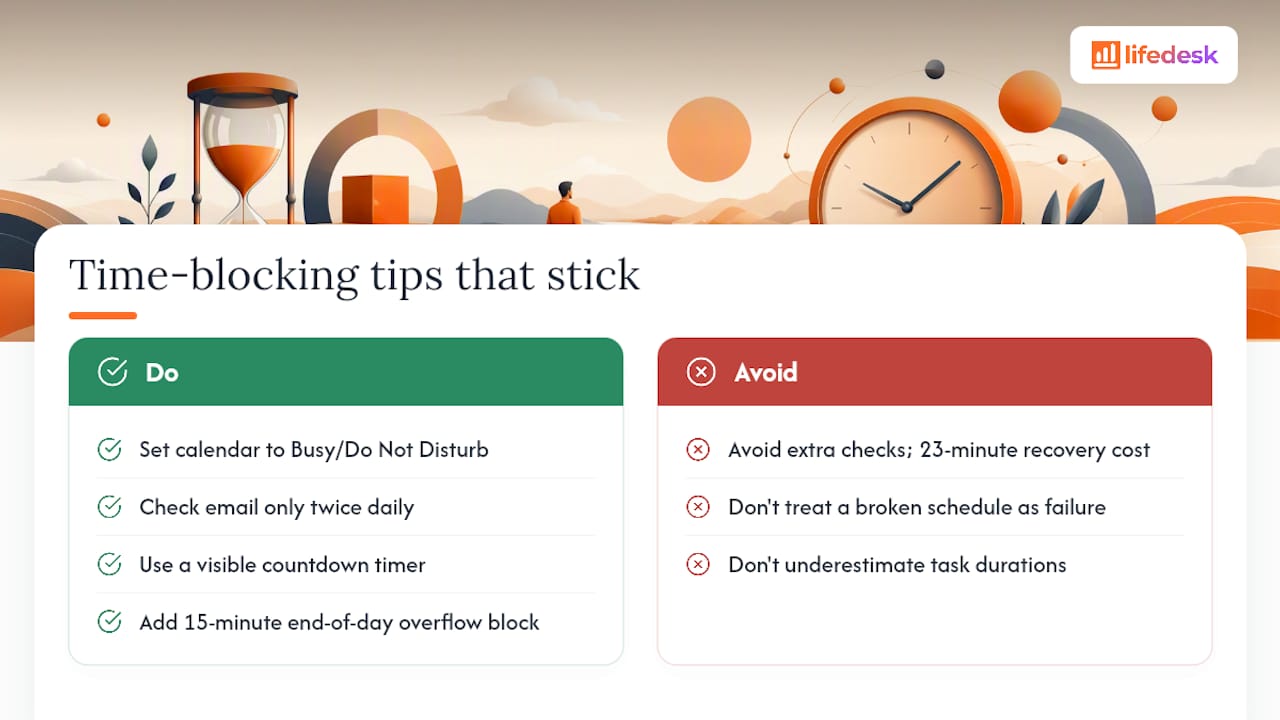
Protect blocks like meetings. Set your calendar status to “Busy” or “Do Not Disturb” during deep-work blocks. If a colleague can see your calendar, a visible block is a soft signal that you’re unavailable. Most people respect it.
Batch your communications. Check email twice a day at fixed times. Every additional check is a potential 23-minute recovery cost. Close the tab between windows.
Use a visible timer. A physical countdown timer or a browser tool like Toggl Track makes the block boundary real. When you can see time passing, you’re less likely to drift.
Estimate generously. Beginners almost always underestimate task duration. A useful heuristic: take your first estimate and add 20–30%. You’ll be closer to accurate, and your buffer blocks will stay empty more often.
Pro Tip:Add a 15-minute “overflow capture” block at the end of each day. Any task that didn’t finish gets a quick note: what’s left, how long it will take, and which block tomorrow it belongs in. This takes three minutes and prevents the mental load of unfinished work from bleeding into your evening.
When the day goes off-plan (and it will), don’t treat the broken schedule as a failure. Triage: decide which remaining blocks are non-negotiable, defer the rest to tomorrow’s plan, and move on. A time-blocked schedule is a plan, not a contract.
Three ready-to-use templates
Template 1: Daily deep-work-first
6:00–7:00   Morning routine / exercise
7:30–9:00   Deep work block 1
9:00–9:15   Buffer
9:15–10:45  Deep work block 2
10:45–11:00 Buffer
11:00–11:30 Email & communications
11:30–12:30 Meetings
12:30–1:30  Lunch
1:30–3:00   Shallow work / admin
3:00–3:15   Break
3:15–4:30   Project work or calls
4:30–5:00   Email & wrap-up
Template 2: Weekly day-theme
Monday:    Client deliverables (deep work all day)
Tuesday:   Writing and content creation
Wednesday: Meetings and collaboration
Thursday:  Admin, finance, and planning
Friday:    Review, learning, and flexible catch-up
Template 3: Mixed day with Pomodoro micro-blocks
8:00–9:30   Deep work (3 × 25-min Pomodoro + 5-min breaks)
9:30–9:45   Buffer
9:45–10:00  Email
10:00–11:30 Deep work (3 × 25-min Pomodoro + 5-min breaks)
11:30–12:00 Admin tasks
12:00–1:00  Lunch
1:00–2:30   Meetings or collaborative work
2:30–3:30   Shallow work batch
3:30–4:00   Email & comms
4:00–4:15   Overflow capture block
For a printable version, copy any template into a plain text file or a spreadsheet and print it as a weekly planner. Most digital calendars let you create recurring events for each block, so you only set it up once.
How do you adapt time blocking for your specific situation?
Parents
Caregiving creates hard constraints that most productivity advice ignores. Work with them, not against them. Build your schedule around school drop-off, nap times, and pickup windows as fixed anchors. A 45-minute deep-work block during nap time, protected and prepared the night before, often produces more output than a distracted 3-hour stretch. Micro-blocks of 20–30 minutes can handle email, admin, and planning tasks in the gaps between caregiving.
Freelancers
Protecting billable hours is the financial version of protecting deep work. Block your highest-value client work during your peak energy window and treat those blocks as client commitments, because they are. If you work across time zones, align your communication blocks to overlap with client business hours, then keep the rest of your day for focused delivery. Time management for freelancers often comes down to this single discipline: the billable block is sacred.
Students
Combine day theming with Pomodoro micro-blocks. Theme each day around a subject or project (Monday: calculus, Tuesday: essay drafts) and use 25-minute Pomodoro cycles within each study block. This prevents the common student trap of “studying” for three hours while actually reading the same paragraph repeatedly. A 90-minute themed block with three focused cycles and two short breaks typically produces more retained learning than an unstructured afternoon.
Shift workers
Fixed schedules don’t apply here, but anchor windows do. Identify one or two consistent windows in your day, regardless of shift pattern, and protect them for your most important personal or professional priorities. A 30-minute learning block before each shift, or a 20-minute planning block after, can create enough structure to make the rest of the day feel intentional. Communicate your anchor windows to family or housemates so they know when you’re unavailable.
Across all personas, one principle holds: tell the people around you what your blocks mean. A quick note to a colleague (“I’m heads-down until 11 AM”), a shared family calendar, or a status update in Slack costs 30 seconds and prevents most interruptions before they happen.
Key Takeaways
Time blocking works because it converts vague intentions into fixed calendar commitments, eliminates context switching, and forces realistic workload planning before the day begins.
Point
Details
Block deep work first
Schedule your most demanding tasks during your peak energy window, before meetings or email.
Keep blocks 60–90 minutes
Cognitive focus peaks in this range; beyond two hours, quality and accuracy decline.
Add buffer blocks
Place 15-minute buffers between major tasks to absorb overruns and prevent schedule cascades.
Review every night
A nightly review of tomorrow’s blocks reduces morning decision fatigue and improves follow-through.
LifeDesk unifies the system
LifeDesk combines calendar, tasks, recurring blocks, and time tracking in one app so your plan and your work live in the same place.
LifeDesk makes time blocking easier to maintain
Most people who try time blocking abandon it within two weeks, not because the method fails, but because they’re managing it across three separate apps: a calendar, a to-do list, and a time tracker. LifeDesk puts all of that in one place.
With LifeDesk’s tasks and goals features, you can pull your priority tasks directly into calendar blocks without switching apps. Recurring blocks for deep work, communications, and buffers take about two minutes to set up and repeat automatically each week. The built-in time tracker lets you compare your planned blocks against actual time spent, which is the fastest way to improve your duration estimates. And because LifeDesk syncs across web, iOS, and Android, your schedule is consistent whether you’re at your desk or checking your phone between meetings.
The free plan covers the core workflow. If you want recurring blocks, the AI assistant for planning, and cross-category tracking (tasks, goals, health, finance), the paid plans unlock those features. Start with the free plan at lifedesk.me and import one of the templates from this guide to get your first blocked week running today.
Time blocking is a scheduling method where you assign specific tasks to fixed calendar slots instead of working from an open to-do list. Each block has a start time, end time, and a single named purpose.
Is time blocking actually effective?
Yes. Research on implementation intentions shows a medium-to-large effect on follow-through when people specify when and where they’ll do a task. Studies also show that context switching costs roughly 23 minutes of recovery time per interruption, and time blocking reduces how often those interruptions occur.
Is time blocking good for ADHD?
Shorter blocks of 20–25 minutes, combined with visible timers and clear transition rituals, tend to work better than the standard 60–90 minute window. The Pomodoro technique nested inside a larger themed block is a practical starting point.
What is the 3-3-3 rule and how does it relate to time blocking?
The 3-3-3 rule is a daily planning heuristic: spend three hours on your most important project, complete three shorter tasks, and handle three maintenance items. It maps directly onto a time-blocked day by giving you a framework for how to label and prioritize your blocks before you schedule them.
What is the difference between time blocking and timeboxing?
Time blocking reserves a window for a task and lets you finish when the work is done. Timeboxing sets a hard stop: when the clock runs out, you stop regardless of completion. Timeboxing is better for tasks that tend to expand; time blocking is better for deep work that needs flow.