The fastest way to turn emails into tasks is to use your inbox’s built-in conversion feature (Outlook’s drag-to-Tasks or Gmail’s Tasks panel) for one-off items, and automation rules for anything that repeats. Manual capture works fine at low volume; once the same type...
A hobby project planner is a tool, template, or notebook system that helps you capture ideas and, more importantly, always know your single next physical action. Right now, pick one tool, however basic, and write down the very next step for your current project....
AI agents reclaim your schedule by auto-scheduling tasks, defending focus blocks, and resolving conflicts before you even notice them, but only when you keep human-in-the-loop controls turned on. The strongest results come from task-first tools that unify your to-do...
Calendar finance integration works best when you match the method to the job: native iCal feeds or a calendar-first finance app for visibility, middleware like Zapier or IFTTT for quick pilots, and API plus webhooks for anything running in production. Most finance...
A life management system is a compact loop: capture what hits you, prioritize it, schedule it, and review it on a set cadence. That’s the whole mechanism. Everything else, from Pomodoro timers to color-coded calendars, just fills in the loop. The single best first...
The best marketing planner for freelancers fits on one page, ties to a single measurable outcome, and runs on a weekly rhythm with a fixed monthly review. That’s it. No 40-tab spreadsheet, no funnel diagram with seventeen boxes. Just one page: who you serve, what...
Start with a simple template that has defined fields, a 4 to 6 week working window, and one owner per item. Assign a status to every entry (idea, draft, review, scheduled, published) so nobody has to ask “where is this?” in a Slack thread. Your next move: open a...
Run this every morning: scan your calendar for two minutes, pick three Most Important Tasks (MITs), assign each one a rough time block, add a 15% buffer, then lock the plan and walk away. That is a complete daily planning routine, and it takes 5 to 10 minutes if you...
A weekly planning routine that actually works comes down to three moves: reflect on last week, gather everything competing for your attention, then plan your top priorities into real time slots. Do it in that order and the whole thing takes 20 to 30 minutes for a...
Your net worth is total assets minus total liabilities — and tracking it over time turns a single number into a trend you can actually act on. Here’s how to get a working snapshot in the next hour, then keep it current in under 15 minutes a month. Quick-start steps:...
5 step AI goal planning workflow that schedules your first week
AI goal planning converts a single sentence of intent, like “I want to get fit” or “I want a promotion,” into a measurable SMART goal with milestones, weekly tasks, and deadlines already attached. Within minutes, you get a concrete plan for the next seven days plus reminders scheduled around it. Tools like LifeDesk build this into one connected system rather than a one-off chat response you have to copy elsewhere.
TL;DR:
AI goal generators produce quick, structured SMART goals but often lack long-term memory for ongoing tracking unless paired with accountability tools.
Effective AI goal planning involves defining constraints clearly, breaking goals into milestones and weekly tasks, and time-blocking them into a calendar for better execution.
Persistent memory and integrated tracking features are crucial for staying on course and adjusting plans as real-life conditions change over weeks or months.
Formalized planning systems that incorporate constraints and optimization models outperform simple chatbot-based schedules on complex, multi-constraint goals.
Human judgment remains essential for prioritizing, adjusting, and interpreting progress to prevent overconfidence and ensure plans stay aligned with actual circumstances.
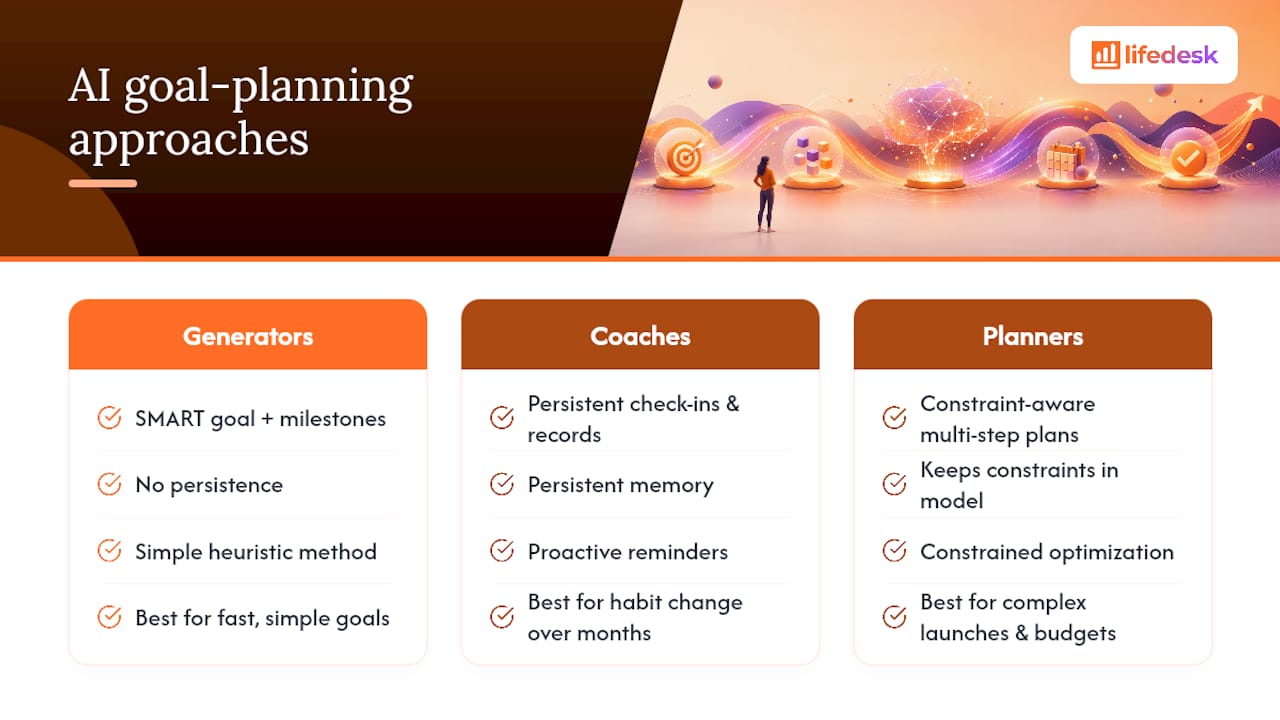
Not every AI tool solves the same problem, and picking the wrong category wastes more time than it saves. Three distinct approaches exist, and knowing which one you’re dealing with matters more than which brand you pick.
AI goal generators take a vague statement and output a structured SMART goal with milestones attached. Ask for “better fitness” and you get something like “Run a 5K in under 30 minutes by June 1, training three times a week.” Tools such as Taskade’s goal-setting generator work this way: fast, useful for simple goals, but they generally don’t remember you tomorrow.
AI accountability coaches solve that memory problem. Products like Pensy and Accountability Coach AI keep a persistent record of your commitments and check in proactively instead of waiting for you to open the app. That persistence is the actual differentiator between a tool you use once and one that changes behavior over months.
Planner and solver systems handle goals with real constraints: multiple deadlines, budget limits, dependent tasks. Research on LLMFP shows that encoding planning as a constrained optimization problem, rather than asking a chatbot to “just figure it out,” significantly improved optimal planning performance across several test tasks. That’s the approach worth reaching for on complex, multi-step goals: launching a business unit, coordinating a home renovation, planning a career pivot with financial constraints baked in.
How Do You Actually Use AI to Plan a Goal?
Most people skip straight to typing “help me set a goal” into a chatbot and get a generic paragraph back. A better process takes five steps and maybe twenty extra minutes, but it produces something you can act on the same day.
Write one sentence with real constraints. Not “I want to save money” but “I want to save $5,000 in 6 months while working 40 hours a week.” The deadline and the limit are what make the next step useful.
Run it through an AI goal generator. Ask it to convert your sentence into a SMART goal with a specific number, date, and measurement method. Push back if the first output is vague. Refine the target until it’s something you could put on a scoreboard.
Break it into milestones and weekly tasks. Ask the AI to decompose the goal into monthly checkpoints, then weekly actions with estimated time and priority. This is where a lot of generic tools stop; a good planner keeps going.
Put the tasks on a real calendar. Time-blocking each task, rather than leaving it on a list, is what actually gets it done. LifeDesk’s time-blocking approach is built around exactly this handoff from plan to schedule.
Review weekly and replan when you stall. A short 20-minute weekly planning ritual is enough to catch a goal drifting off track and ask the AI to adjust the plan around what actually happened.
Pro Tip:Give the AI your failure mode up front, like “I tend to skip Mondays,” and ask it to build the schedule around that instead of pretending you’re a different person than you are.
Copyable SMART Goal Templates You Can Use Today
A template only helps if it’s specific enough to act on. Here are three you can adapt in under a minute, plus the exact prompt structure that produces them.
Career: “Complete a project management certification and lead one cross-team project by September 30, dedicating 3 hours weekly to coursework.”
Health: “Walk 8,000 steps daily and strength train twice a week, tracked via app, reaching consistency for 8 straight weeks by April 15.”
Learning: “Finish a 40-hour online data analytics course and complete 2 practice projects by May 31, studying 5 hours per week.”
Business: “Grow freelance monthly revenue from $3,000 to $4,500 within 90 days by pitching 3 new clients weekly.”
The prompt behind all four follows the same shape: state the outcome, the deadline, and the weekly time budget, then ask for “a SMART goal with three milestones and a first-week task list.” Tools built on the SMART framework generally return exactly that structure without extra formatting requests.
What Should You Track, and How Often?
Tracking a goal without a cadence is how most plans quietly die by week three. The metrics that matter are simpler than most dashboards suggest:
Completion rate: percentage of scheduled tasks actually finished each week.
Time on task: whether estimated durations match reality (they usually don’t, at first).
Milestone lead or lag: are you ahead of or behind the checkpoint dates.
Streaks: consecutive days or weeks a habit-based task got done.
The cadence that works for most people is daily micro-tasks, a weekly review, and a monthly milestone check. Daily is too granular for reflection; monthly is too slow to catch a stall before it becomes a pattern.
This is where persistent memory earns its keep. AI systems that remember your commitments across weeks can flag a stalled goal and propose a replan before you’ve mentally given up on it, instead of waiting for you to notice and re-engage the tool yourself.
Ask the AI to cut the goal’s scope in half rather than pushing through with the same plan.*
How Do You Choose an AI Goal-Planning Tool?
A few features separate tools that support real progress from ones that produce a nice-looking plan you’ll never open again.
Persistent memory so the tool remembers last week’s plan instead of starting cold every session.
Calendar and task export so the plan lands somewhere you’ll actually see it daily.
Measurement dashboards that show completion trends, not just a static task list.
Clear data export and privacy terms, especially if you’re linking financial or health information.
Watch for a few red flags: outputs that reset every session with no memory, a free tier so limited it’s unusable without upgrading, and vague language about how long your data is retained. For a simple 30-day goal, a lightweight generator is fine. For anything spanning months with financial or scheduling dependencies, a formal planning approach with structured task decomposition holds up far better under real-world drift.
LifeDesk as a Working Example of the Full Loop
Most tools handle one piece of this workflow and leave you to stitch the rest together yourself. LifeDesk implements the whole loop, generation through scheduling through tracking, inside a single app, which is part of why it’s built into this guide rather than treated as an afterthought.
Its Tasks and Goals feature breaks a goal into projects and subtasks with deadlines and priorities attached. From there, tasks move into calendar time-blocks, and the app’s AI assistant can regenerate a weekly plan when you fall behind rather than leaving you to manually rebuild it. Because it runs on web, iOS, and Android, the plan you build at your desk on Monday is the same one nudging you on your phone Thursday morning.
Where AI Goal Planning Still Falls Short
AI is genuinely good at commonsense decomposition, turning “learn Spanish” into a study schedule, but it struggles with goals that involve multiple shifting constraints over a long horizon. Research on formalized planning frameworks notes that large language models often fail on long-horizon, multi-constraint tasks unless paired with a formal planner or a verification step that checks feasibility before you commit to the plan.
There’s also a context problem. An AI generating your goal doesn’t know that your job just got busier, that a family emergency ate your week, or that your original deadline was arbitrary in the first place. It can only work with what you tell it, and most people don’t update that context often enough for the plan to stay realistic.
Overconfidence is a subtler issue. A generated plan can look polished and specific, three milestones, clean percentages, tidy dates, while resting on a target that’s simply wrong for your situation. A tool that outputs a confident-sounding plan isn’t the same as a tool that understands your actual constraints.
Finally, most consumer-facing generators are stateless by default. Without persistent memory, you’re re-explaining your situation every time you open the tool, which quietly discourages the very check-ins that make a plan stick. That’s less a limitation of AI generally and more a reason to be selective about which tool you commit to using week after week.
Why Human Judgment Still Runs the Show
AI goal planning works best as a drafting partner, not a decision-maker. It’s fast at producing a structured first draft: milestones, weekly tasks, rough time estimates. What it can’t do is weigh your actual priorities against each other, tradeoffs, only you can make.
The healthiest workflow treats the AI’s output as a starting point you’re allowed to argue with. If it suggests three hours a week of study and you know realistically you have ninety minutes, change the number before you commit to the plan. If a milestone date feels arbitrary, push back and ask for options rather than accepting the first date offered.
Where this matters most is in the weekly review. An AI can flag that you’re behind schedule and propose a replan, but deciding whether to extend the deadline, cut scope, or push harder for two weeks is a judgment call shaped by things outside the plan: how you’re actually feeling, what else is competing for your time, whether the original goal still matters to you the same way it did a month ago.
Practitioners working with formal planning systems for complex goals recommend a monitoring layer that enforces constraints and backtracks only when necessary, rather than replanning from scratch every time something shifts. The human equivalent is similar: adjust the plan, don’t throw it out. Treat the AI as the system that keeps the plan current and visible, while you keep the authority over what the plan is actually for.
Is Your Goal Data Safe With an AI Planner?
Goal data sounds harmless until you consider what it actually contains: income targets tied to bank information, health metrics, relationship goals, business revenue figures. Any tool that generates and tracks goals across those categories is handling information worth protecting carefully.
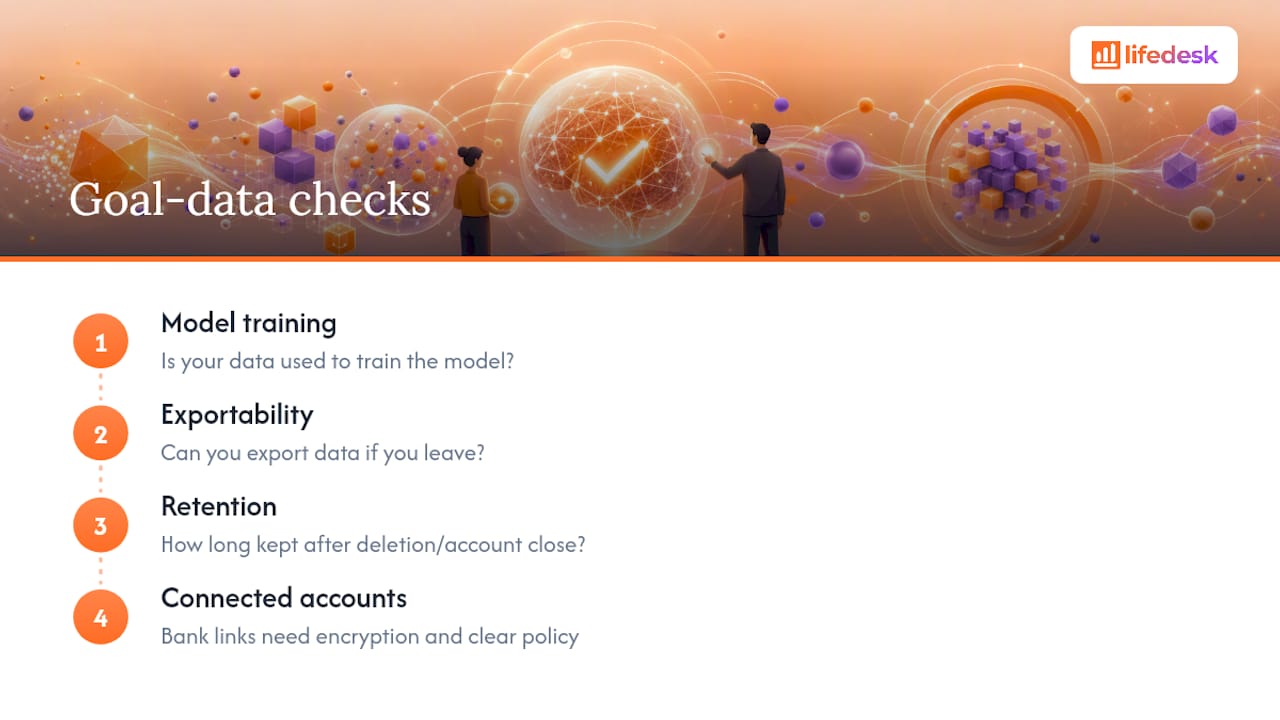
Three questions are worth asking before you commit to a tool. First, is your data used to train the underlying AI model, or kept private to your account? Many consumer tools default to using data for model improvement unless you opt out, and that setting is often buried several menus deep. Second, can you export your data if you leave, or is it locked into a format only that app understands? Third, how long is data retained after you delete a goal or close an account?
Tools that connect to financial accounts carry extra weight here. If a goal-planning app links to your bank to track a savings target, that connection should come with bank-level encryption standards and a clearly published retention policy, not a vague line in a terms-of-service document nobody reads. LifeDesk publishes its approach to sensitive categories directly in its health data privacy policy, which is the kind of specificity worth looking for in any tool handling personal metrics, not just health ones.
The practical rule: treat goal data with the same caution you’d apply to financial data, because for a lot of users, it increasingly is financial data. Before connecting any account or entering sensitive targets, check whether the app states its retention period and export options in plain language, not legal boilerplate.
What’s Next for AI-Driven Goal Planning?
The direction of travel is toward planners that separate the “thinking” from the “generating.” Research on frameworks like EAGLET shows systems being trained specifically to plan, using synthesized plan datasets and reinforcement learning, rather than relying on a general-purpose language model to improvise a schedule each time. That distinction, a dedicated planning layer versus a chatbot guessing at structure, is likely to define which tools actually hold up on complex, multi-month goals.
Expect deeper integration with calendars and financial accounts, not just task lists. A goal planner that can see your actual calendar load and your real account balance can propose a schedule that’s grounded in your week, instead of an idealized one that assumes you have hours you don’t.
Expect more solver-backed planning for constrained goals, following the pattern LLMFP demonstrated: treating a goal as an optimization problem with explicit constraints, rather than a free-text request. That approach scales far better to goals involving budgets, deadlines, and competing priorities than a purely conversational tool ever will.
And expect accountability features to get quieter and better timed, less generic daily pings, more check-ins triggered by an actual pattern: three missed tasks in a row, a milestone slipping past its date. The goal isn’t more notifications. It’s fewer, better-timed ones that show up exactly when a plan needs a human decision.
Try AI Goal Planning Inside LifeDesk
Most standalone AI goal generators hand you a nice-looking plan and stop there. You still have to copy the tasks into a calendar app, set your own reminders, and build a tracking sheet if you want to see whether you’re actually keeping pace. LifeDesk skips that handoff entirely by keeping generation, scheduling, and tracking inside one app instead of three.
On your first visit, you can turn a one-sentence goal into a structured SMART plan, export the resulting tasks straight into your existing calendar, and see your first week of scheduled actions before you close the tab. The Tasks and Goals feature handles the breakdown into milestones and weekly actions, while time-blocking puts those tasks on a real schedule instead of leaving them stranded in a list you’ll forget to check. If your goal involves a business target rather than a personal one, the business tasks and goals feature applies the same structure to client work and revenue milestones. Set up your first goal and see the week’s task list populate in your calendar before you decide whether to commit further.
Write a one-sentence intention with a clear deadline and constraint, then ask an AI generator to convert it into a SMART goal with three milestones and a first-week task list you can put directly on a calendar.
What is the 5-4-3-2-1 goal method?
It’s a simplification technique some coaches use: 5 long-term goals, 4 yearly priorities, 3 monthly targets, 2 weekly actions, and 1 daily task, narrowing a big ambition down to something actionable today. Definitions vary by source, so treat the exact numbers as a flexible structure rather than a fixed rule.
What are examples of SMART goals?
A SMART goal names a specific target, a number to measure it by, a realistic scope, why it matters, and a deadline, such as “Save $5,000 in 6 months” or “Run a 5K in under 30 minutes by June 1.”
Is there a free SMART goals template?
Yes. Most AI goal generators, including free tiers of tools like Taskade, will produce a SMART goal template at no cost, and LifeDesk’s free plan supports basic goal and task creation without a subscription.
Does AI goal planning actually work better than writing goals myself?
AI speeds up the structuring step and catches vague targets you might not refine on your own, but the research on long-horizon planning suggests the biggest gains come from pairing AI generation with a consistent weekly review, not from the AI output alone.