Use a list when your tasks are short, independent and mostly done in one sitting. Use a Kanban board when work passes through stages, when several things are in progress at once, or when you keep losing track of what is stuck. Most people need both: a list for...
Use a calendar for anything that happens at a specific time, and a to-do list for anything that only needs to happen eventually. Most people get stuck when they ask one tool to do the other’s job. A list can’t tell you whether Tuesday has room for a task, and a...
Mood and energy tracking means logging, a few times a day, how you feel and how much fuel you have, then reading the entries for patterns. Do it in 10 to 20 seconds per entry, 3 to 4 times a day, for two weeks. Add one line of context (what you were doing), and you...
A good personal dashboard is one screen that answers the few questions you ask yourself every day: What is next? Am I on track? What needs me right now? You set it up by choosing 4 to 6 widgets, arranging them in four zones, and deleting everything that does not earn...
Daily metrics tracking means watching a few current, high-frequency numbers that warn you early and let you correct course. Start by choosing a key performance question, then pick a small set of daily measures that answer it, such as time on priority tasks, completed...
Design daily boundaries, protect deep work, and run weekly reviews: that combination does more for sustainable balance than any single trick. Expect steadier energy and less burnout drift once boundaries are in place, and you can start today by picking one boundary (a...
Use time blocking for sustained deep work on a single project, and use task batching to group shallow, repeatable tasks into one focused session. Both methods solve the same underlying problem, which is constant context switching, but they solve it differently, and...
Open a dedicated business bank account and route every bit of business income there, right from the start. Pair it with a business credit card and standalone bookkeeping, and pay yourself through documented draws or payroll instead of pulling cash whenever you need...
Plan 2026 by picking 3 to 5 annual priorities, writing an if-then plan for each using mental contrasting, converting every priority into tracked projects and milestones, and running quarterly plus weekly reviews inside one integrated planner. This approach keeps...
Founders should track three things first: deep work hours, personal well-being basics like sleep and movement, and a weekly review. Start with one to three habits, log them in under 60 seconds each morning, and treat the data as a business input rather than a personal...
Content Calendar Planning for Creators and Marketing Teams
Start with a simple template that has defined fields, a 4 to 6 week working window, and one owner per item. Assign a status to every entry (idea, draft, review, scheduled, published) so nobody has to ask “where is this?” in a Slack thread. Your next move: open a template, either LifeDesk’s quick tools or a spreadsheet you already have, and fill in working titles for the upcoming weeks. Success looks like this: posts go out on the days you planned, ownership is visible at a glance, and nobody is writing a caption at 11 p.m. the night before.
Key Takeaways
Content calendar planning works when a simple template, clear ownership, and a realistic planning horizon combine into a repeatable weekly rhythm.
Point
Details
Start small and specific
Fill 4 to 6 weeks with real working titles and named owners before worrying about tools.
Use a hybrid horizon
Plan campaigns 3 to 6 months out, tactical content 4 to 6 weeks out, and leave 10 to 30% open for reactive posts.
Build fields once
Publish date, owner, status, pillar, and UTM tags cover most of what any team needs.
Keep approvals lean
One or two approvers with a 48 hour timebox prevents the calendar from stalling.
Choose tools by team size
Spreadsheets work for solo creators; LifeDesk’s marketing planner suits teams that want content, tasks, and goals in one app.
Why Content Calendar Planning Actually Moves the Needle
A calendar fixes three problems at once: inconsistent publishing, unclear ownership, and wasted assets. Teams that go from ad hoc posting to a documented plan often see a significant improvement in their scheduled-post completion rate simply because someone can see what’s late. That visibility alone changes behavior.
The bigger win is coordination. Content calendars map what publishes, where, and by whom, which turns a scattered list of ideas into something a team can actually execute against and measure. When status and owner fields sit right next to the publish date, accountability stops being a guessing game.
Secondary benefits stack up fast once the structure exists:
Repurposing gets easier because old entries show exactly what pillar and format they belong to.
Briefs shrink because the calendar already carries the working title and target keyword.
Assets get reused instead of recreated, since links live right in the entry.
Pro Tip:Track one number for the first month: percentage of scheduled posts actually published on time. It’s the fastest signal that your calendar is working.
How Do You Build a Content Calendar Step by Step?
You don’t need a big kickoff meeting to start. Six steps, done in order, gets you a working calendar by the end of the week.
Define your goals and pillars. One pillar might be “practical tutorials for new users.” Keep pillars few enough that you can name them without checking a document.
Choose a cadence per channel. A reasonable starter: blog content every few weeks, several social posts per week, and email content at a similar moderate frequency. Some teams use a structure that details one month of production while planning themes for subsequent months.
Pick a tool and build the core fields. Whether it’s a spreadsheet or a dedicated app, decide cadence and pillars before you build the template structure, not after. Building fields first without a cadence just produces an empty grid.
Populate 4 to 6 weeks with specific working titles and owners. Vague placeholders like “Blog Post 3” get skipped. Real titles get written.
Set a status workflow and a review cadence. A 15 to 30 minute weekly check-in catches slippage before it becomes a Friday scramble.
Plan distribution and measurement. Decide who tags UTMs, who cross-posts, and who checks performance a week after launch.
Working backward from each publish date to a draft due date and a review date, as Averi’s planning framework recommends, keeps the whole chain visible instead of hidden inside one person’s head.
What Fields Belong in Every Content Calendar Template?
A calendar template earns its keep through its fields, not its color scheme. Skip a field here and someone will ask about it in Slack next week.
Working title: specific enough that a writer can start without a briefing call.
Publish date and due date: the deadline that matters and the deadline before it.
Channel and content type: blog, LinkedIn, newsletter, short video.
Owner: one name, not “marketing team.”
Status: idea, drafting, in review, scheduled, published.
Pillar/topic and target keyword: ties the piece back to strategy.
Funnel stage: awareness, consideration, or conversion.
Asset links, distribution notes, UTM tags, and priority.
“Content calendar planning that works” doesn’t mean a prettier spreadsheet. It means writing specific working titles rather than generic labels, so whoever picks up the entry can start executing without waiting on a separate brief.
Sample row: “5 Ways Freelancers Waste Billable Hours” — March 18 — Blog — Sarah — In Review — Pillar: Productivity — Keyword: time management for freelancers — Funnel: Consideration — Priority: High.
Spreadsheet, Workflow Tool, or Integrated Platform?
Spreadsheets cost nothing, work everywhere, and fall apart past a handful of contributors.
Collaborative workflow tools give you calendar and list views, status fields, and approval steps, which suits growing teams juggling several channels.
Integrated publishing platforms add native scheduling and analytics, cutting out the copy-paste step between planning and posting.
Whatever you pick, check for calendar and list views, visible ownership, asset links, an approval step, and mobile access. The simplest workflow to remember: idea, brief, draft, review, schedule, publish, promote, measure.
Pro Tip:If your team already manages projects and deadlines somewhere else, look for a calendar tool that lives next to that work instead of one more separate login. LifeDesk’s project features handle production timelines and status tracking alongside the content plan itself.
How Far Ahead Should You Plan Your Calendar?
Strategic campaigns need long lead times; routine posts don’t. Locking a product launch three months out while leaving next Tuesday’s Instagram caption unplanned until Monday are both mistakes, just in opposite directions.
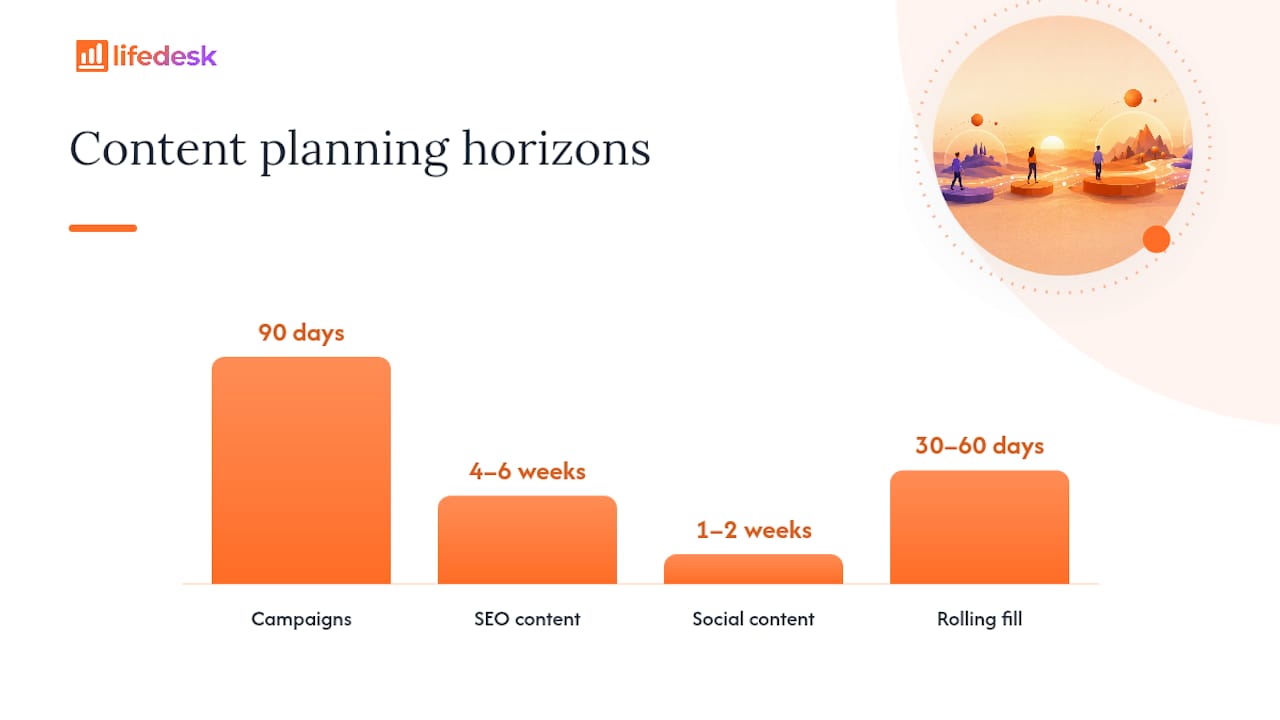
A workable hybrid: map big campaign moments several months ahead, plan tactical content production several weeks ahead, and leave a portion of your slots open for reactive posts. Semrush’s content calendar guide recommends roughly that same split, SEO content 4 to 6 weeks out, social content 1 to 2 weeks out, with weekly reviews to keep the plan current.
Strategic and operational planning solve different problems. Long lead times protect alignment on big moments; short lead times protect your ability to react to what’s actually happening.
Run it as a 90 day roadmap for campaigns sitting on top of a rolling 30 to 60 day fill for everyday content.
Keeping Approvals and Collaboration From Becoming a Bottleneck
A calendar dies the moment approvals take longer than the content itself. Connect your calendar to the tools your team already checks daily: your CMS, a social scheduler, cloud storage for assets, analytics for results, and whatever messaging app carries your notifications.
Approval workflows work best kept lean:
Limit required approvers to one or two people, never a committee.
Timebox every review to 48 hours or less.
Make status labels visible to the whole team, not just the owner.
Set automatic reminders instead of chasing people manually.
For day-to-day collaboration, assign a named owner to every entry, write real working titles instead of placeholders, attach assets directly to the calendar row, pin a distribution checklist for cross-posting, and hold one short weekly review meeting. Coordinating formats across social platforms gets considerably easier once everyone can see the same calendar instead of five different documents.
Why LifeDesk Works as Your Content Calendar and Marketing Planner
Most calendar tools handle scheduling and stop there, leaving you to track the actual production work, the client follow-ups, and the invoicing somewhere else entirely. LifeDesk keeps your content calendar, project tasks, and business goals in the same workspace, so a publish date and the three tasks behind it live on one screen instead of three apps.
The marketing planner gives every entry an owner, a status, and a due date, the same fields this guide just walked through, but wired directly into your broader task and goal tracking. A few concrete reasons solopreneurs and small teams pick it:
One workspace for content, tasks, and client deliverables, so nothing gets tracked twice.
Status fields and ownership visible across web, iOS, and Android.
An AI assistant that can turn a rough idea into a working title and short brief.
Time tracking built in, useful for freelancers billing by the hour.
Open a free template and fill in your next four weeks today, or explore the full platform to see how content planning fits alongside everything else you manage.
Decide your publishing cadence and content pillars first, then build a template with fields like owner, status, and publish date, and populate the next 4 to 6 weeks with specific working titles.
What does a typical content calendar look like?
A typical calendar is a grid or list showing publish date, channel, content type, owner, and status for each piece, often paired with a rolling 30 to 60 day production view.
What is the primary goal of a content calendar?
Its primary goal is coordination: making sure the right content publishes on the right channel, on time, with a clear owner accountable for getting it done.
How far in advance should I plan content?
Can one tool handle both planning and publishing?
Yes. Integrated platforms combine scheduling with production tracking; LifeDesk’s marketing planner pairs calendar fields with task and project tracking in the same app.