Project and client management work best as two linked systems, not one blurred job. Delivery lives on scope, schedule, and resourcing; the relationship lives on trust, expectations, and retention. Agencies that connect them, with a shared client record and a fixed...
Calendar task integration turns your to-do list into scheduled, time-bound calendar blocks so work actually gets done instead of piling up unseen. The fastest path is either a native tasks layer inside your calendar app or an OAuth-based connector syncing a separate...
Quarterly planning means running your business goals on a 90-day cycle instead of a single annual push, reviewing progress and adjusting course every quarter. The practical version that works best: pick a few measurable priorities, assign a clear owner to each, set...
Most people don’t need one framework. They need three, stacked by time horizon: a long-range direction setter like a BHAG or OGSM, a quarterly execution engine like OKRs, and SMART criteria to keep the resulting key results honest and measurable. Skip the strategic...
The PARA method sorts every file, note, and task you own into four folders (Projects, Areas, Resources, Archives) based on how soon you need to act on it. The main payoff is speed: you stop hunting through nested folders and start finding what you need in seconds,...
The best prioritization frameworks for anyone juggling client work, personal goals, and everything in between are the Eisenhower Matrix, the Pareto principle (80/20), the 1-3-5 Rule, time blocking, and a weekly review. Pick one today: schedule a 90-minute protected...
The fastest way to turn emails into tasks is to use your inbox’s built-in conversion feature (Outlook’s drag-to-Tasks or Gmail’s Tasks panel) for one-off items, and automation rules for anything that repeats. Manual capture works fine at low volume; once the same type...
A hobby project planner is a tool, template, or notebook system that helps you capture ideas and, more importantly, always know your single next physical action. Right now, pick one tool, however basic, and write down the very next step for your current project....
AI agents reclaim your schedule by auto-scheduling tasks, defending focus blocks, and resolving conflicts before you even notice them, but only when you keep human-in-the-loop controls turned on. The strongest results come from task-first tools that unify your to-do...
AI goal planning converts a single sentence of intent, like “I want to get fit” or “I want a promotion,” into a measurable SMART goal with milestones, weekly tasks, and deadlines already attached. Within minutes, you get a concrete plan for the next seven days plus...
CRM vs Project Management for Freelancers: Pick Right
If you manage both clients and deliverables, the honest answer is this: most freelancers and solopreneurs need an integrated tool that handles both, not a choice between two separate systems. If revenue is your bottleneck, start with CRM. If missed deadlines are killing you, start with project management. If both are problems, an all-in-one app like LifeDesk is the fastest path to a single source of truth.
TL;DR:
Revenue bottleneck (scattered leads, lost follow-ups, cold pipeline): start with CRM features first.
Both at once: an integrated platform that anchors tasks to contacts removes the context-switching that separate tools create for individuals.
Next step: list your last three client interactions. Were they about finding new work or delivering existing work? That answer tells you where to start.
What actually differs between CRM and project management tools?
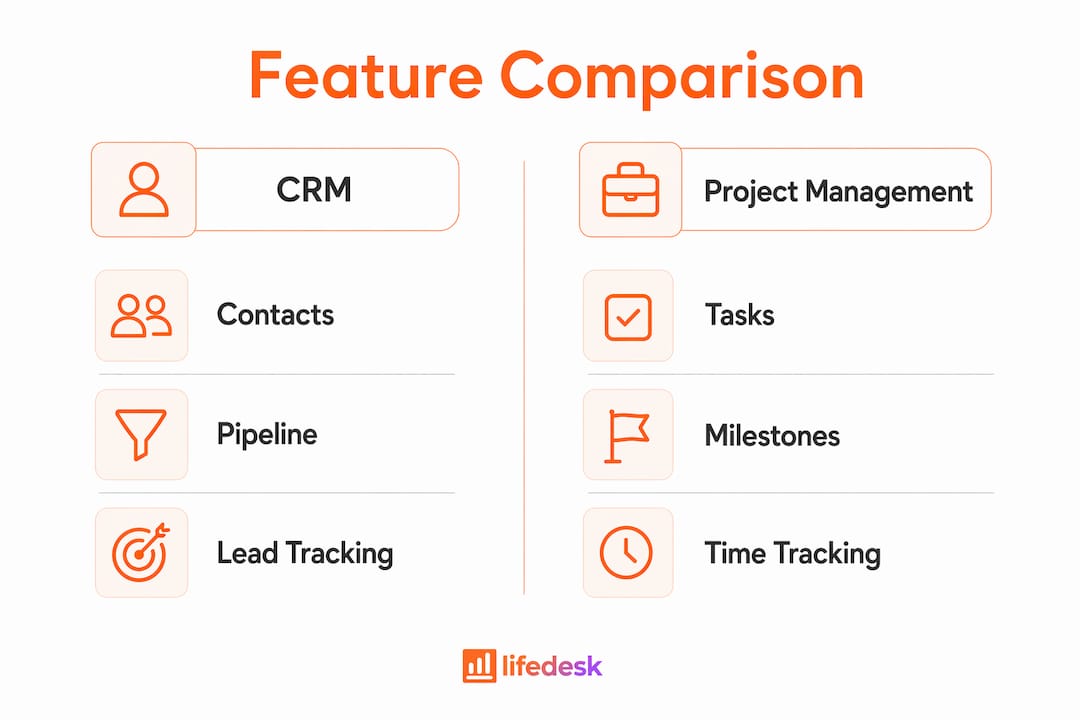
The split is clean once you see it. A CRM is a revenue engine: it tracks people, relationships, deal stages, and the money moving through your pipeline. A project management tool is a delivery engine: it tracks tasks, milestones, deadlines, and who owes what by when.
That difference in focus changes everything about how data is structured. In a CRM, the central record is a contact or deal. In a project management tool, the central record is a task or project. The same client follow-up looks completely different depending on which lens you use:
CRM view: “Acme Corp — proposal sent, follow up in 3 days, deal value $4,200, stage: negotiation.”
PM view: “Write proposal draft — due Friday, assigned to me, linked to Acme project.”
Neither is wrong. They just answer different questions. CRM answers “where is this relationship going?” PM answers “what needs to get done and when?”
The evidence backs this up. Industry research consistently shows that businesses using CRM software see measurable improvements in sales productivity and customer retention — but those gains only hold when the tool is actually used to manage relationships, not repurposed as a task list.
For individuals managing blended personal and business lives, all-in-one platforms can reveal capacity constraints earlier, because personal obligations show up right next to professional deadlines. That visibility alone changes how you prioritize.
How do you decide which approach to start with?
Start with one question: Is your biggest problem finding and keeping clients, or delivering for the ones you already have?
That single diagnostic cuts through most of the confusion around which tool to pick first. Here is a five-minute audit to run right now:
Count your cold leads. How many potential clients have you not followed up with in the last two weeks? More than three: CRM-first.
Count overdue deliverables. How many tasks or client projects are past their deadline today? More than two: PM-first.
Check your communication gaps. When did you last proactively update a current client on their project status? More than a week ago: you need both, and the handoff between them is leaking.
Identify your last lost deal. Was it lost because you forgot to follow up (CRM gap) or because you delivered late and damaged trust (PM gap)?
Situation
Recommended first step
Solo consultant with scattered leads and no pipeline
CRM-first
Creative freelancer with steady clients but missed deadlines
PM-first
Part-time freelancer balancing family care and client work
Integrated app
Solopreneur just starting out, no clients yet
CRM-first
Established freelancer losing clients after delivery
PM-first + handoff fix
Individual managing personal goals alongside client projects
Integrated app
Pro Tip:If you start with CRM and add PM later, set up the handoff trigger before you need it. The moment a deal closes is exactly when context gets lost — promises made in sales disappear into delivery. Build the bridge while the process is fresh, not after the first missed deadline.
Which features belong to CRM, project management, or both?
Features cluster into three groups. Knowing which group a feature belongs to tells you whether a gap in your current setup is a CRM problem, a PM problem, or a sign you need tighter integration.
Feature
CRM
Project Management
Overlaps
Contact & company records
✓ Primary
—
—
Deal stages & pipeline
✓ Primary
—
—
Tasks & to-dos
Limited
✓ Primary
✓ When anchored to contacts
Milestones & timelines
—
✓ Primary
—
Automations
✓ Follow-ups
✓ Task triggers
✓ Sales-to-project handoff
Billing & time tracking
✓ Invoicing
✓ Time logs
✓ Client billing
Client portal / communication
✓ Primary
✓ Shared boards
✓ Depends on tool
Reporting & dashboards
✓ Revenue
✓ Delivery
✓ Combined view
The overlapping features are where most freelancers get tripped up. Tasks anchored to a contact record behave differently from tasks floating in a project board. When a follow-up reminder lives inside a deal record, you never lose the context of why you’re reaching out. When it lives only in a task list, that context disappears.
A successful integrated setup requires built-in actions linked directly to relationships. Without that link, tasks get orphaned and clients fall through the cracks.
One note on security: combining client relationship data and project data in a single system means your privacy exposure is concentrated. Choose a platform that offers role-based access controls and encrypted storage, especially if client contracts or financial data live alongside personal goals.
How do you integrate CRM and project management without more fragmentation?
The sales-to-delivery handoff is where most freelancers leak revenue and efficiency. A client says yes, the deal closes, and then… the information lives in two places, or nowhere. Three patterns fix this without adding complexity:
Single unified record (best for individuals). One platform where closing a deal automatically creates a project, links it to the contact, and generates a first-week task checklist. No copying, no switching apps.
Lightweight integration (two tools, one automation). If you use separate CRM and PM tools, set up a single automation: when a deal moves to “Won,” create a project in your PM tool with the client name and deal value pre-filled. One trigger, one action.
Hybrid sync (CRM owns contacts, PM owns execution). CRM holds the relationship history; PM holds the task list. A shared field (client name or deal ID) links them. Works, but requires discipline to keep both updated.
Two automation triggers worth setting up immediately:
When deal status changes to “Closed/Won” → create project → assign first onboarding task → set due date to 3 days out.
When a client email is flagged as urgent → create follow-up task → link to contact record → due today.
Pro Tip:For the first 30 days after setting up any integration, check one thing weekly: are there any contacts with closed deals but no linked project? That gap is your leakage point. Fix the trigger, not the symptom.
What should you expect for pricing and setup time?
Most tools in this space follow a freemium model: a free tier with limited contacts or projects, then paid tiers at a range of monthly fees per user that unlock features like bank integrations, AI assistants, time tracking, and higher record limits. For a solo freelancer, the free tier is often enough to validate the workflow before committing.
Realistic timeline expectations:
Days 1–3: Import contacts, set up one pipeline stage, create one active project. You get immediate value with minimal configuration.
Week 1–2: Add automations, connect billing or time tracking, refine task templates.
Weeks 2–6: Full migration of historical contacts and projects, process adjustments, and habit formation.
For migration, the practical approach is: export contacts and deals as a CSV, map only the fields you actually use (name, email, deal value, next action), pilot with one to three live clients, then bulk-migrate after confirming your templates work.
How LifeDesk handles the CRM + project management setup for freelancers
LifeDesk supports a full sales-to-delivery flow in a single record model, where tasks stay anchored to people and goals rather than floating loose in a separate app.
A starter setup takes about an hour:
Create a contact for each active or prospective client using LifeDesk’s client management features. Add deal stage, value, and next follow-up date.
Log the deal and move it through pipeline stages. When it closes, create a linked project directly from the contact record.
Link tasks to the contact so every deliverable traces back to the client relationship. Use business task and goal tracking to connect project work to broader business goals.
Enable time tracking for billable work so invoicing pulls from actual logged hours, not estimates.
Sample workflow: sales call happens → deal created in client record → project auto-created with first-week checklist → client update scheduled for day 5. The whole chain lives in one place.
All-in-one platforms avoid “abandoned tool” syndrome by keeping the system accessible and visible rather than governance-heavy. LifeDesk is built on that principle: personal goals, client relationships, and project tasks share the same interface, so nothing requires a separate login to check.
Pro Tip:Start with five contacts and two active projects. Resist the urge to migrate everything on day one. A lean system you actually use beats a complete system you avoid.
Key Takeaways
For freelancers and individuals, the CRM vs project management decision is really a question of which bottleneck to fix first — but an integrated setup that links tasks to contacts and deals to projects is the most durable long-term solution.
Point
Details
Identify your bottleneck first
Revenue gaps point to CRM; missed deadlines point to project management.
The handoff is the leak
The sales-to-delivery transition is where context and revenue most often get lost.
Integrated beats separate
Anchoring tasks to contact records removes context switching and orphaned to-dos.
Rollout is faster than you think
Most freelancers get real value within 3–7 days with a minimal viable setup.
LifeDesk covers both
LifeDesk’s single-record model links clients, deals, projects, and tasks in one place.
LifeDesk: one place for clients, projects, and everything in between
Running your client relationships and project delivery from separate tools means you’re manually bridging a gap that should not exist. LifeDesk gives freelancers and solopreneurs a single platform where contacts, deal pipelines, projects, tasks, goals, and finances all connect. No copy-pasting client names between apps. No wondering whether the task in your PM tool matches the promise in your CRM.
The LifeDesk features page shows the full capability set, from client management and project tracking to time tracking and bank-connected finance. If you want to get started immediately, the quick-start tools include templates that get your first client workflow running in under an hour. Free plan available; no credit card required to start.
Sources & further reading
CRM vs Project Management — Copper
CRM and project management software — GetOrvo
CRM vs project management tools — ConvergeHub
Benefits of CRM — Salesforce
All-in-one CRM and project management — CRMSoftwareGuide
CRM benefits — CRM.PH
LifeDesk client management features
LifeDesk project management features
LifeDesk business tasks & goals
Author note: This guide was written by a productivity and workflow specialist with experience in freelance operations and integrated life-work management systems. Customer case studies and author credentials available on request.
FAQ
What is the core difference between CRM and project management?
A CRM manages relationships, leads, and revenue pipeline. Project management software manages tasks, milestones, and delivery timelines. They answer different questions: CRM asks “where is this client relationship going?” while PM asks “what needs to get done and by when?”
Do freelancers need both CRM and project management tools?
Most do, but not necessarily as two separate apps. An integrated platform that links contacts to projects covers both needs without the context-switching cost of maintaining two systems.
Where do freelancers most often lose revenue between CRM and PM?
The sales-to-delivery handoff is the most common leak point. When a deal closes and project details are not automatically transferred, promises made in sales get lost in delivery.
How long does it take to set up an integrated CRM and project management workflow?
Most freelancers get usable value within about a week with a minimal setup. Full migration of contacts, historical projects, and process adjustments typically takes several weeks.
Can LifeDesk replace both a CRM and a project management tool?
LifeDesk’s single-record model connects client contacts, deal stages, projects, tasks, and billing in one platform, covering the core functions of both without requiring separate apps or manual data syncing.