A recurring task is any piece of work that comes back on a pattern: the weekly invoice run, the Tuesday workout, the monthly tax set-aside, a client’s birthday. The best way to manage them is to decide two things for each one: what triggers the next copy (the calendar...
A life operating system (often shortened to Life OS) is one connected setup where your goals, projects, tasks, calendar, notes, money and habits live together and inform each other. A to-do list only stores actions. A life OS also tells you why those actions matter...
The most reliable way to plan work and personal life together is to stop splitting them. Write every commitment into one inventory, put it on one calendar, rank it by importance and urgency, give it a block of time, and review the plan weekly. The rest of this guide...
A calendar time audit is a review of what your calendar says you did over the past few weeks, set against what you say matters. You export or scroll back through four to eight weeks, sort every block into a handful of categories, add up the hours, and compare the...
TL;DR A goal only becomes real when it has a date, a duration and a place on the calendar. Recurring blocks are one of the simplest ways to do this. Structure goals in layers: one or two main missions, projects that act as milestones, and daily actions. Plan, then...
Use a list when your tasks are short, independent and mostly done in one sitting. Use a Kanban board when work passes through stages, when several things are in progress at once, or when you keep losing track of what is stuck. Most people need both: a list for...
Use a calendar for anything that happens at a specific time, and a to-do list for anything that only needs to happen eventually. Most people get stuck when they ask one tool to do the other’s job. A list can’t tell you whether Tuesday has room for a task, and a...
Mood and energy tracking means logging, a few times a day, how you feel and how much fuel you have, then reading the entries for patterns. Do it in 10 to 20 seconds per entry, 3 to 4 times a day, for two weeks. Add one line of context (what you were doing), and you...
A good personal dashboard is one screen that answers the few questions you ask yourself every day: What is next? Am I on track? What needs me right now? You set it up by choosing 4 to 6 widgets, arranging them in four zones, and deleting everything that does not earn...
Daily metrics tracking means watching a few current, high-frequency numbers that warn you early and let you correct course. Start by choosing a key performance question, then pick a small set of daily measures that answer it, such as time on priority tasks, completed...
Agencies & Freelancers: 4 Decisions for Project and Client Management
Project and client management work best as two linked systems, not one blurred job. Delivery lives on scope, schedule, and resourcing; the relationship lives on trust, expectations, and retention. Agencies that connect them, with a shared client record and a fixed communication rhythm, protect margins and keep clients engaged instead of losing both to silent drift.
TL;DR:
Connecting client and project management with a shared client record, milestone tracking, and regular cadence reduces scope creep and improves profitability.
Regular margin checks at each milestone, along with client engagement scores and task blockages, help catch issues early before they impact the budget or client relationship.
Using clear gates between project stages, such as scope sign-off and milestone approvals, prevents projects from progressing on assumptions and avoids scope creep.
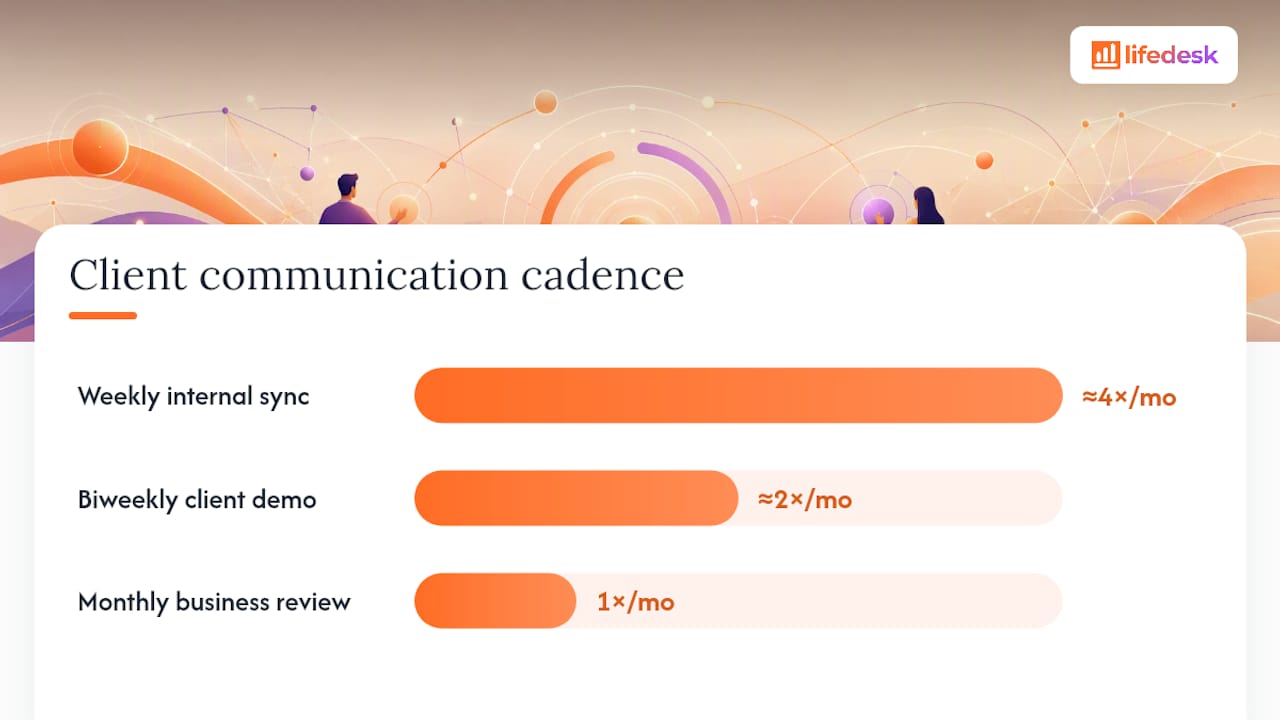
A fixed communication rhythm involving internal, biweekly, and monthly touchpoints decreases rework and scope changes, enhancing trust and retention.
Centralizing client, project, and financial data in a single system like LifeDesk simplifies management for freelancers and small teams, avoiding the time drain of disconnected tools.
LifeDesk
Bring Projects and Priorities Together
LifeDesk brings tasks, goals, calendars, finances, and business organisation into one place for clearer freelance and agency management.
What’s the Difference Between Client and Project Management?
Client management runs the relationship: proposals, onboarding, renewal conversations, and the ongoing sense a client has of whether they’re getting what they paid for. Project management runs the work: scope definition, task sequencing, resource assignment, and formal delivery acceptance. Confuse the two and you get a common agency failure pattern: the project is technically on track, but the client feels ignored, or the client feels great while the budget quietly bleeds out.
The split matters most at handoffs, where ownership tends to get fuzzy.
Approvals: client management secures the yes; project management defines what exactly was approved and by when.
Invoices: client management owns the commercial promise (price, payment terms); project management supplies the proof of work that justifies the invoice.
Change requests: client management handles the conversation and expectation reset; project management prices the change and adjusts the schedule.
Each function also has its own scorecard. Client management gets judged on retention, referrals, and satisfaction. Project management gets judged on on-time delivery, budget adherence, and rework rate. Blending those metrics into one vague “how’s it going” check-in is how both start slipping without anyone noticing until a renewal conversation goes badly.
Why Loose Client and Project Management Cost You Money
Common recurring problems behind stalled projects and client churn include scope creep that isn’t repriced, scattered communication with no single record, and profitability issues that often go unnoticed until projects are over budget, as reported by agency practice insights such as Teamwork’s analysis.
Organizations can lose value if client engagement and benefits realization are not measured together with project handoffs, since focusing only on task completion may let client relationships erode unnoticed, as suggested by PMI’s Pulse of the Profession research PMI report.
Three metrics catch these problems early enough to fix them:
Project margin at each milestone, not just at project close, so a bleeding project gets caught in week three instead of month three.
Client engagement score, a simple blend of recent touchpoints, overdue approvals, and open issues that flags relationship risk before a client goes cold.
Tasks blocked on client input, which surfaces exactly where the client, not the team, is the bottleneck.
Catching a margin slip at milestone two costs you a pricing conversation. Catching it at delivery costs you the client.
The Client Project Lifecycle: Stages and Decision Gates
Every client project moves through the same core stages, whether it’s a two-week freelance gig or a six-month agency retainer. The stages matter less than the gates between them. These are the specific checkpoints that stop a project from sliding forward on assumptions instead of agreements.
Initiation: capture the intake form and proposal. This is where you define acceptance criteria up front, since a single missing acceptance criterion is one of the most common root causes of rework that shows up late in a project.
Planning: convert the signed statement of work into a project plan with milestones, owners, and dates. Gate: scope sign-off, in writing, before a single task starts.
Execution: the delivery phase, tracked against the plan with regular status checkpoints. Gate: budget approval checkpoints at each major milestone, not just at kickoff.
Review and revision: client feedback against the acceptance criteria set in initiation, not against new criteria invented mid-project.
Closure: formal client acceptance, final invoice, and a retrospective that feeds the next proposal.
Project pipeline management borrows this same gate logic at the portfolio level: staged checkpoints for ideation, intake, prioritization, delivery, and closure keep an agency from overcommitting capacity across multiple clients at once, according to Portfolio Hub’s breakdown of pipeline stages. The templates worth building once and reusing forever are the intake form, a one-page SOW, a milestone-based project plan, and a short acceptance checklist. Skip any one of them and the gate it protects becomes optional, which is exactly how scope creep gets in.
Practical Habits That Protect Client Trust and Margins
The gap between agencies that stay profitable and agencies that don’t usually isn’t talent. It’s whether they run a repeatable client cadence or wing it project by project.
A workable cadence looks like three fixed touchpoints: a weekly internal sync to catch blockers before the client does, a biweekly client demo to show progress and surface feedback early, and a monthly business review for anything strategic, budget, renewal, or scope direction. Agency guides typically associate a predictable communication rhythm with reduced escalations and less rework caused by unexpected scope changes, as noted by Teamwork’s client project research.
Scope control needs rules, not goodwill:
Capture every change request in writing, even the ones that arrive as a casual Slack message.
Price the change before you start it, not after.
Require a client signature or written approval on anything that adds more than a day of work.
Profitability habits are just as mechanical. Run a margin check at every milestone instead of waiting for project close. Require time tracking specifically on scope changes, since that’s where hours quietly vanish without anyone billing for them.
Pro Tip:Tag every out-of-scope task the moment it’s requested, even before it’s approved. A tagged backlog of unbilled asks is the fastest way to win a repricing conversation, because you’re showing the client a list, not making an argument.
CRM or Project Management Tool: How They Connect
A CRM tracks the relationship: contact history, proposal status, deal stage, renewal dates. A project management tool tracks the work: tasks, dependencies, time logged, deliverable status. Neither one covers the other’s job well, which is exactly why so many agencies run both and then struggle to keep them in sync.
The integration points that actually matter are narrower than they look.
One client record that both systems point to, so nobody’s updating a name or contact detail in two places.
Milestone sync, so a schedule slip in the PM tool shows up automatically as a flag in the client-facing view.
Billing integration, tying tracked time or completed milestones directly to invoices instead of manual re-entry.
A client portal or shared view, so status updates don’t rely on someone remembering to send an email.
Agency-focused platforms bundle client dashboards and profitability tracking into project tools to address integration challenges, as shown by Upbase’s features. Smaller teams often find a single connected system more efficient than multiple specialized tools, which can be time-consuming to integrate. This tends to hold particularly for teams under about 25 people, according to research on client relationship tools like AwiFin. For more, see this CRM and project management comparison.
How Do You Set Up a Combined Client and Project System?
You don’t need new software to start; you need four decisions made before your next client kickoff.
Build one client record that holds contact info, proposal history, and links to every active project, so nobody hunts across three tools for a status.
Standardize your intake form to capture acceptance criteria and decision-makers up front, not halfway through the project.
Create one reusable project template with milestones and default task owners, so every new client project starts from the same skeleton.
Lock in your cadence schedule (weekly, biweekly, monthly) before the project starts, and put it on the calendar, not just in a proposal document.
Assign a rollout owner for the first month: one person checks that every active client has a filled-out record and a scheduled cadence by week two, then reviews what’s missing at week four.
Checkpoint
What to measure
What it tells you
Week 1
Every active client has a single record and scheduled cadence
Setup is actually complete, not just planned
Week 4
Percent of change requests captured in writing before work started
Whether scope control is holding
—
Margin trend across milestones and client engagement scores
Whether the system is protecting profit and retention
If a freelancer-focused project management guide fits your team size better than an enterprise process, start there and add complexity only when a real client project demands it.
Stakeholder Engagement Beyond the Client Contact
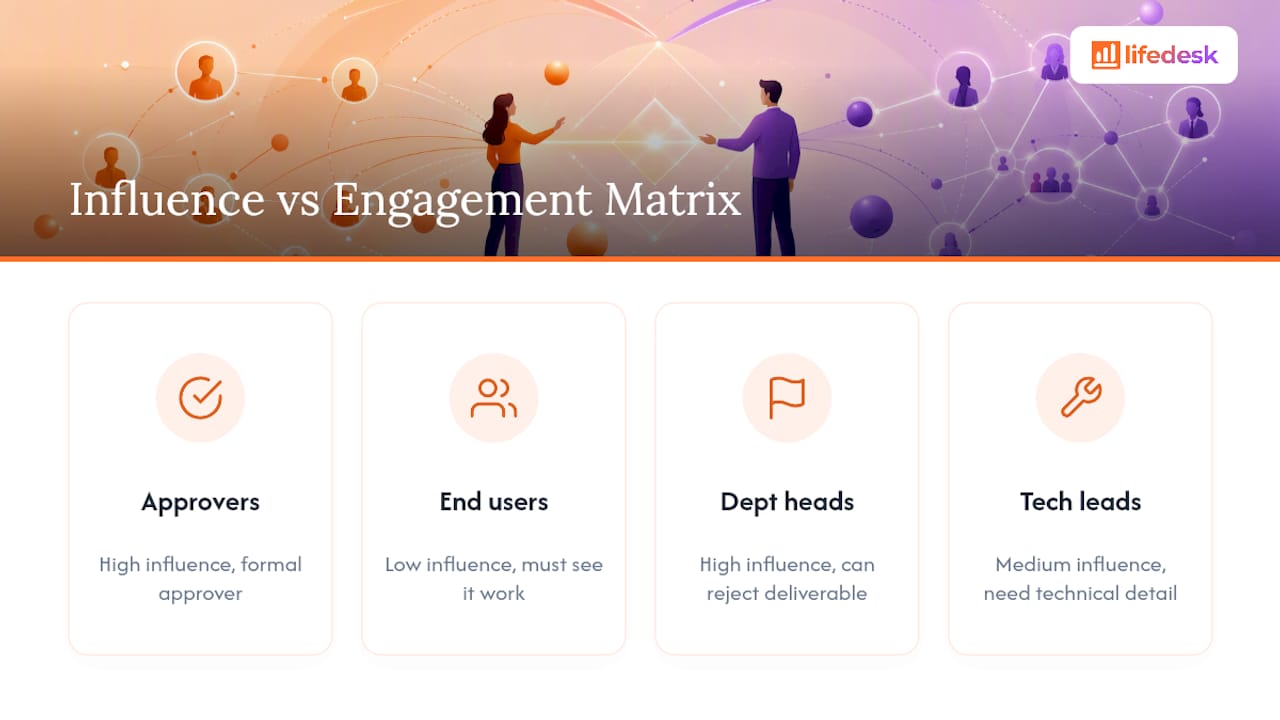
The person signing your invoice is rarely the only person whose opinion decides whether a project succeeds. Internal approvers, end users, department heads who inherit the deliverable, and sometimes a client’s own client all shape whether a project gets called a win.
Map stakeholders early, not after a surprise objection shows up in week six. A quick exercise works: list everyone who can approve, block, or meaningfully influence the outcome, then rank each by how much power they have and how engaged they currently are. The people with high influence and low engagement are your risk. A department head who never joins a demo but has final sign-off authority is exactly the person who can reject a deliverable that every other stakeholder already loved.
Engagement doesn’t mean flooding every stakeholder with the same weekly update. It means matching the message to the role: a technical lead needs implementation detail, a budget approver needs cost and timeline, an end user needs to see the thing actually work. Sending everyone the same status email is efficient and useless at the same time.
Build stakeholder check-ins into your existing cadence rather than treating them as an extra task. If your monthly business review already happens, add fifteen minutes for a secondary stakeholder who hasn’t weighed in recently. The goal isn’t more meetings. It’s making sure the person who can quietly kill a project at the finish line has actually seen it coming, and had a chance to raise a concern before the deadline, not after.
Resolving Conflict Between Clients and Delivery Teams
Most client conflicts aren’t really about the disagreement on the table. They’re about a mismatch between what was promised and what was delivered, and by the time it surfaces as a heated email, both sides have already stopped listening to specifics.
The fastest way to defuse it is to separate the emotional temperature from the factual dispute. Acknowledge the frustration directly, then pull up the actual record: the signed scope, the acceptance criteria, the change request log. A conflict about “you never told me this would cost extra” gets resolved in minutes if you can point to a dated, written change order. It drags on for weeks if the only record is someone’s memory of a phone call.
Give the delivery team a script for these moments instead of leaving it to improvisation. The person closest to the work usually isn’t the right person to negotiate the commercial fallout; that’s a client management job. The delivery team should document what happened factually and hand the relationship conversation to whoever owns the account. Mixing the two, having a developer justify a timeline slip while also trying to manage the client’s anger, usually makes both worse.
The best conflict resolution habit is preventive: build a short cool-down step into your process where any scope disagreement waits 24 hours for a written response instead of an immediate reactive one. It sounds slow. It prevents nearly every conflict from escalating past a solvable disagreement into a relationship-ending one.
Balancing Workload Across Client Projects
Overloading your best people on your biggest clients feels like the obvious move until the third client in a row asks where their deliverable is. Resource allocation in client work fails most often not because there’s too much work, but because the same two or three people are quietly assigned to everything important.
Look at real capacity before committing to new scope, not optimistic capacity. A pipeline view that shows priority, current stage, and projected future load, the same logic behind Epicflow’s pipeline overview, catches the moment before you say yes to a fourth concurrent project that no one actually has hours for. Pipeline management research backs this directly: checking proposed work against real capacity, rather than wishful resourcing, is what prevents the “start everything” trap that quietly kills delivery rates across an entire client roster.
Balance workload by role, not just by headcount. Track individual load weekly, not monthly, since a two week lag in noticing overload is often the difference between catching it and losing the person entirely.
Build in slack on purpose. Teams that plan every hour of every week have no room to absorb a client’s inevitable last minute request, which is exactly the moment a small ask turns into a missed deadline for someone else’s project.
Where LifeDesk Fits Into This Checklist
There are dedicated CRMs and there are dedicated project tools, and plenty of agencies run both successfully. But if you’re a freelancer or a small team trying to build the exact system this article just walked through, single client record, project templates, a fixed cadence, visible margins, running that logic across two or three disconnected tools is its own tax on your time.
LifeDesk was built around that specific problem: keeping personal and business organization, including client management and project delivery, in one connected view instead of scattered across separate apps. A single client record links directly to that client’s active projects and templates, time tracking runs against real tasks so scope changes get logged automatically instead of estimated after the fact, and business finances, including real bank account tracking, sit next to the project data instead of in a separate accounting tool. The platform’s own positioning is built on replacing five to ten separate single-purpose apps with one connected system, which matches almost exactly the rollout checklist in this article: one record, one template, one cadence, one place to see margin.
You can see how the client management features map to the intake and cadence steps above, and check the Free, Plus, and Pro plans to see which tier fits your team size before you commit to a rebuild of your current stack.
Sources
For deeper industry context beyond this checklist, three sources are worth your time: PMI’s Pulse of the Profession for benchmark trends on value leakage, Portfolio Hub’s pipeline management guide for staged pipeline mechanics, and Teamwork’s client project breakdown for practitioner-level tactics on scope and communication.
Definitions vary depending on the source, but a common version covers client, communication, cost, scope (change control), and closure, the checkpoints that recur across most client project frameworks. The core idea is consistent everywhere it appears: the client relationship and the delivery mechanics need to be tracked as separate but connected threads.
What Are the Top Skills for a Project Manager Handling Clients?
The three that matter most for client-facing project work are clear written communication, disciplined scope control, and the ability to read early warning signs in a relationship before they become a formal complaint. A project manager who’s technically strong but avoids the hard client conversations will lose more margin to unbilled scope creep than one with average technical skills who catches problems early.
What Are the 5 Stages of Project Management?
The standard sequence is initiation, planning, execution, monitoring and review, and closure, with a decision gate between each stage. Scope sign-off happens at the planning gate, budget approval checkpoints happen throughout execution, and formal client acceptance closes the loop before final invoicing.
What Types of Project Management Approaches Exist for Client Work?
Agencies typically choose between waterfall style fixed-scope delivery, agile sprint-based delivery, and hybrid models that fix the overall budget while keeping task sequencing flexible, as outlined in Custom Software Development Services. The right choice usually comes down to how well the client can define requirements up front. A vague brief calls for an agile approach with frequent check-ins; a tightly scoped brief can run fixed-scope with fewer touchpoints.
Does LifeDesk Work for Freelancers Managing Multiple Clients?
Yes. The platform keeps a single client record connected to project templates, time tracking, and business finances, which fits how solo freelancers and small teams manage several client projects at once without needing separate CRM and project tools. Current pricing for the Free, Plus, and Pro plans is listed on the site so you can compare tiers before switching.