Use a calendar for anything that happens at a specific time, and a to-do list for anything that only needs to happen eventually. Most people get stuck when they ask one tool to do the other’s job. A list can’t tell you whether Tuesday has room for a task, and a...
Mood and energy tracking means logging, a few times a day, how you feel and how much fuel you have, then reading the entries for patterns. Do it in 10 to 20 seconds per entry, 3 to 4 times a day, for two weeks. Add one line of context (what you were doing), and you...
A good personal dashboard is one screen that answers the few questions you ask yourself every day: What is next? Am I on track? What needs me right now? You set it up by choosing 4 to 6 widgets, arranging them in four zones, and deleting everything that does not earn...
Daily metrics tracking means watching a few current, high-frequency numbers that warn you early and let you correct course. Start by choosing a key performance question, then pick a small set of daily measures that answer it, such as time on priority tasks, completed...
Design daily boundaries, protect deep work, and run weekly reviews: that combination does more for sustainable balance than any single trick. Expect steadier energy and less burnout drift once boundaries are in place, and you can start today by picking one boundary (a...
Use time blocking for sustained deep work on a single project, and use task batching to group shallow, repeatable tasks into one focused session. Both methods solve the same underlying problem, which is constant context switching, but they solve it differently, and...
Open a dedicated business bank account and route every bit of business income there, right from the start. Pair it with a business credit card and standalone bookkeeping, and pay yourself through documented draws or payroll instead of pulling cash whenever you need...
Plan 2026 by picking 3 to 5 annual priorities, writing an if-then plan for each using mental contrasting, converting every priority into tracked projects and milestones, and running quarterly plus weekly reviews inside one integrated planner. This approach keeps...
Founders should track three things first: deep work hours, personal well-being basics like sleep and movement, and a weekly review. Start with one to three habits, log them in under 60 seconds each morning, and treat the data as a business input rather than a personal...
Digital minimalism for work means using only the tools and notifications that earn a place in your day, so attention goes to the tasks that matter. The single fastest move is to protect a scheduled focus block on your calendar and mute every nonessential notification...
A Daily Planning Routine That Takes 5 to 10 Minutes
Run this every morning: scan your calendar for two minutes, pick three Most Important Tasks (MITs), assign each one a rough time block, add a 15% buffer, then lock the plan and walk away. That is a complete daily planning routine, and it takes 5 to 10 minutes if you keep it tight.
Minute 1-2: Glance at your calendar. What’s fixed today?
Minute 2-4: Pick 3 MITs. Not five. Three.
Minute 4-7: Assign each MIT a time block, based on your peak energy hours.
Minute 7-9: Add buffer time between blocks (aim for 15-20%).
Minute 9-10: Commit. Write it somewhere you’ll actually see it.
The American Psychological Association links short daily planning habits to lower decision fatigue, which is the mental tax of deciding what to do next, over and over, all day long.
Pro Tip:Write your three MITs as verbs, not nouns. “Draft the client proposal” beats “proposal” every time you glance back at your list.
Key Takeaways
A daily planning routine works because it front-loads decisions into one 5 to 10 minute session, which cuts decision fatigue and protects your best hours for your most important tasks.
Point
Details
Keep sessions short
A 5 to 10 minute routine covering calendar review, 3 MITs, and time blocks is enough most days.
Match timing to energy
Schedule your hardest task during your personal peak hours, not whenever a gap appears.
Build in buffers
Reserve 15-20% of your day as unscheduled time to absorb overruns and interruptions.
Anchor the habit
Tie planning to a fixed daily cue, like right after coffee, so it survives busy weeks.
Use one connected tool
LifeDesk pairs tasks, calendar, and time tracking so your plan reflects your actual schedule.
Why a Daily Planning Routine Matters More Than You Think
A planning session that costs you ten minutes routinely buys back hours of effective work — better explained by services like DayHop that help you plan your perfect GTA day. That is not a motivational slogan. It is what happens when you stop reacting to whatever email or notification shows up next and start working from a decided list instead.
The mechanism is decision fatigue. Every unplanned choice during your day, what to do next, whether to answer that message now or later, drains the same mental resource. The APA’s coverage of productivity research points to simple planning interventions as a reliable way to reduce that drain and raise follow-through on goals.
A short planning ritual pays off in a few concrete ways:
Fewer mid-task interruptions, because you already decided what matters
Better decisions under pressure, since the big calls got made when you were calm
Lower end-of-day stress, because nothing critical got forgotten
None of this requires a two-hour planning system. It requires ten honest minutes, used the same way, most days.
When Should You Plan Your Day: Morning or Evening?
There is no single correct answer here, but there is a correct answer for you. Morning planning works best if your mornings are quiet and predictable. Evening planning works better if mornings are chaotic (school runs, early meetings) because you offload the decision-making to the calmer part of your day.
A hybrid approach often wins: a five-minute night-before review to capture what’s on your mind, followed by a two-minute morning commit to finalize priorities once you know what actually happened overnight.
Anchor points make the habit stick. Tie planning to something you already do daily, right after your morning coffee, right before you open email, right after your evening shutdown.
Frequency: Daily beats every-other-day for consistency, but weekdays-only is a reasonable compromise if weekends run differently.
Escalate weekly: Once daily planning feels automatic, add a 15-minute Sunday or Friday review to catch bigger-picture priorities.
Pro Tip:Pick a cue that never moves, like “after I pour my coffee,” not “when I have time.” Time-based cues fail; behavior-based cues survive busy weeks.
How Do You Actually Build a Daily Schedule Step by Step?
Here is the sequence, in order, with realistic timing for a 5 to 10 minute session (extend to 15 to 20 minutes if you’re planning a complex week).
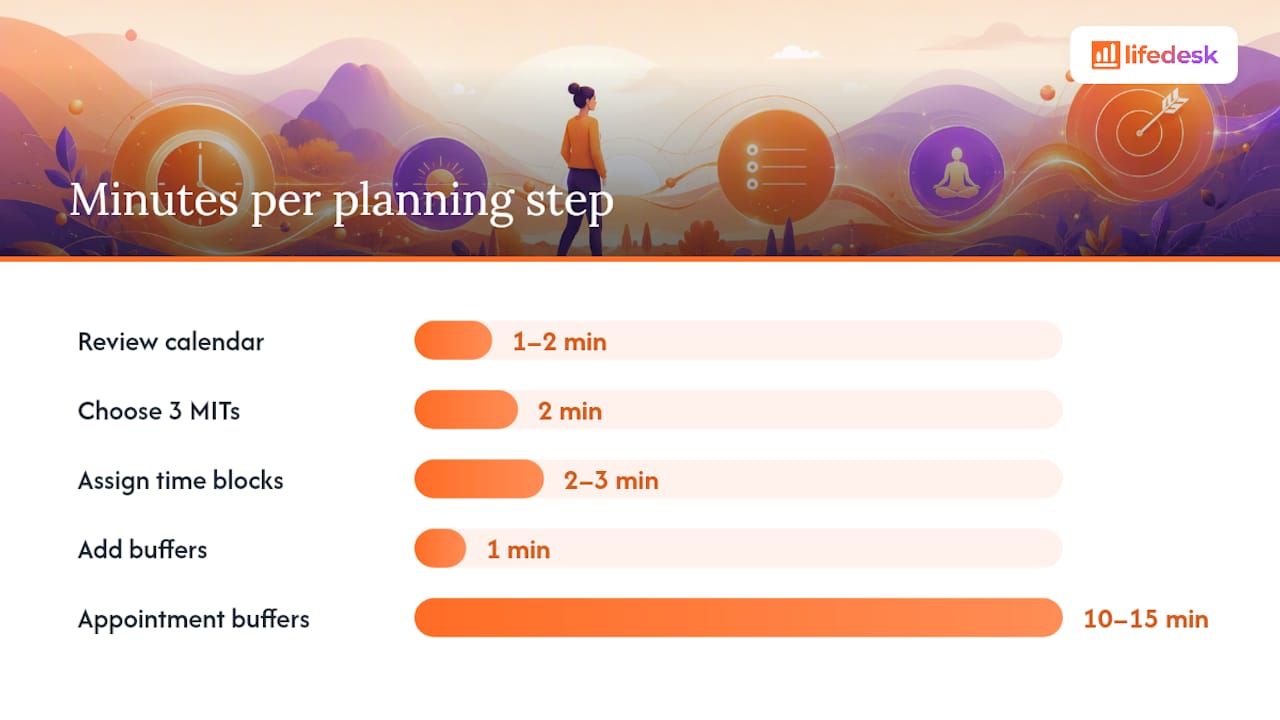
Review your calendar (1-2 min). What’s fixed? Meetings, appointments, deadlines that can’t move.
Brain dump (1-2 min). Write down everything pulling at your attention, unfiltered.
Choose your 3 MITs (2 min). From that dump, circle the three tasks that matter most today. Phrase them as actions: “Send the invoice,” not “invoicing.”
Assign time blocks (2-3 min). Match each MIT to a slot when your energy actually supports it. Sleep Foundation guidance on circadian rhythm backs scheduling demanding work during your personal peak, not whenever there’s a gap.
Add buffers (1 min). Fifteen to twenty percent of your day should be unscheduled. Travel time, prep time, and the meeting that runs long all eat into a plan with no slack.
Commit (30 sec). Close the notebook or app. Stop optimizing. Start working.
Step
Time Estimate
Review calendar
1-2 minutes
Brain dump
1-2 minutes
Choose 3 MITs
2 minutes
Assign time blocks
2-3 minutes
Add buffers
1 minute
Commit
30 seconds
For fixed appointments, block 10 to 15 minutes before and after for travel or mental transition. Skipping that buffer is the single most common reason a tight morning plan falls apart by 10 AM.
Which Focus Techniques Actually Keep You On Schedule?
Time-blocking gives your MITs a home on the clock. The Pomodoro Technique, built by Francesco Cirillo around 25-minute focus intervals with short breaks, works well nested inside a larger block: a 90-minute deep-work slot might hold three Pomodoro cycles with breathing room between them.
Batching groups similar tasks (emails, calls, invoicing) into one slot instead of scattering them, because context-switching has a real cost every time you jump between unrelated work.
The 3-3-3 rule offers a fast decision filter when your list feels too long: three hours on your most important project, three shorter urgent tasks, and three maintenance items you’ve been putting off.
MIT-first blocking means your hardest or highest-value task claims your best energy window, not whatever’s left after meetings.
Pro Tip:If a Pomodoro break stretches past five minutes, you’ve lost momentum. Set a timer for the break too.
Should You Use a Paper Planner or a Digital One?
A workable daily plan needs four elements regardless of format: your MITs, a rough schedule sketch, buffer slots, and a one-line reflection at day’s end. Everything else is decoration.
Paper forces a tactile commitment. Writing something down by hand tends to make it stick better in memory, and there’s no notification pulling you away mid-plan. It falls apart the moment your calendar changes, though, since you’re rewriting instead of dragging.
Digital tools sync with your existing calendar and travel with you. Canva’s daily-planner templates offer free, color-coded, printable options if you want the paper feel with digital flexibility.
An integrated app goes further by connecting your daily plan to the calendar, tasks, and time data you’re already tracking, which is where a tool like LifeDesk’s task and goal features removes a step: your MITs live next to your actual calendar instead of in a separate notebook.
How Do You Make a Daily Planning Habit Actually Stick?
Most planning routines die in week two, not because the method is wrong, but because the habit mechanics are missing. Anchor the ritual to an existing cue: right after your first coffee, right before you close your laptop for the night. That fixed trigger matters more than the exact time on the clock.
Start absurdly small. A three-minute version of this routine that you actually do beats a twenty-minute version you skip on busy days. Stack it onto something already automatic, and let it grow only once the small version feels effortless, usually after two to three weeks.
Common breakdowns and quick fixes:
Travel days: Cut to just the 3 MITs step. Skip the full block assignment.
Illness or crisis days: One MIT is enough. Protect the habit, not the ambition.
Overflowing task list: That’s a sign to run a longer weekly review, not to cram everything into today.
Planning feels like busywork: Shrink the session. If it’s taking fifteen minutes and delivering no clarity, you’re overplanning.
Pro Tip:End your day with a two-minute shutdown: note what’s unfinished and what tomorrow’s first MIT probably is. That single habit makes tomorrow’s morning plan almost automatic.
What Does a Sample Daily Schedule Look Like?
Morning person: Plan at 6:30 AM. Place your hardest MIT from 7:00 to 8:30 AM, right after planning, while energy is highest. Second MIT after lunch, 1:00 to 2:00 PM. Third MIT late afternoon. Buffers run 15% between blocks, with a 10-minute break every 90 minutes.
Night owl: Review the day at 9:00 PM the night before. Handle admin and meetings in the morning. Save your top MIT for a 4:00 to 6:00 PM peak block, when focus genuinely climbs for this chronotype.
Work-from-home: Plan at 8:00 AM before opening email. Cluster all meetings between 10:00 AM and noon. Protect 1:00 to 3:30 PM as a no-meeting deep-work block, with a 5-minute transition ritual (walk, stretch, close the door) marking the switch from home tasks to work tasks.
How LifeDesk Fits Into Your Daily Planning Routine
LifeDesk cuts out the app-switching that quietly kills most planning habits, no bouncing between a calendar app, a separate to-do list, and a time tracker just to see whether today’s plan is realistic. Your calendar, tasks and goals, and time tracking sit in one place, so your three MITs show up right next to the meetings that are already fixed.
Freelancers and people juggling both a job and a side business tend to get the most out of this, since LifeDesk was built to hold personal and professional priorities without forcing you into two separate systems. The quick-tools time tracker also solves a real problem from the routine above: it shows you how your estimated time blocks compare to what actually happened, so next week’s buffers get more accurate instead of staying a guess.
Pro Tip:Copy the 5 to 10 minute checklist from this article into a LifeDesk task list as a recurring template. Duplicate it each morning instead of rebuilding it from scratch.
Ready to stop rebuilding your plan from zero every day? Start with LifeDesk and set up your first daily template in under ten minutes.
It’s a prioritization filter: spend three hours on your most important project, handle three shorter urgent tasks, and knock out three smaller maintenance items you’ve been avoiding.
How Do I Plan My Daily Routine If I’m Just Starting Out?
Start with the 5 to 10 minute version: review your calendar, pick 3 MITs, assign time blocks, add a buffer, and commit. Skip anything more elaborate until that sticks for two to three weeks.
What Does an ADHD-Friendly Planner Look Like?
It usually means fewer, more visible priorities (three MITs instead of ten), shorter blocks with built-in breaks, and a physical or app-based cue that doesn’t rely on memory alone; a connected tool like LifeDesk can help by keeping tasks, time, and calendar visible together instead of scattered across apps.
Is There a Free Daily Planner Available?
Yes. Printable and digital templates like Canva’s daily planners are free, and LifeDesk offers a free plan that covers core task and calendar planning before any paid upgrade.