A weekly review is a short, scheduled ritual where you clear your inboxes, check your calendar, and pick your priorities before the new week starts. The simplest version takes 15 to 20 minutes: dump loose tasks into one list, scan the next seven days, and write down...
Project and client management work best as two linked systems, not one blurred job. Delivery lives on scope, schedule, and resourcing; the relationship lives on trust, expectations, and retention. Agencies that connect them, with a shared client record and a fixed...
Calendar task integration turns your to-do list into scheduled, time-bound calendar blocks so work actually gets done instead of piling up unseen. The fastest path is either a native tasks layer inside your calendar app or an OAuth-based connector syncing a separate...
Quarterly planning means running your business goals on a 90-day cycle instead of a single annual push, reviewing progress and adjusting course every quarter. The practical version that works best: pick a few measurable priorities, assign a clear owner to each, set...
Most people don’t need one framework. They need three, stacked by time horizon: a long-range direction setter like a BHAG or OGSM, a quarterly execution engine like OKRs, and SMART criteria to keep the resulting key results honest and measurable. Skip the strategic...
The PARA method sorts every file, note, and task you own into four folders (Projects, Areas, Resources, Archives) based on how soon you need to act on it. The main payoff is speed: you stop hunting through nested folders and start finding what you need in seconds,...
The best prioritization frameworks for anyone juggling client work, personal goals, and everything in between are the Eisenhower Matrix, the Pareto principle (80/20), the 1-3-5 Rule, time blocking, and a weekly review. Pick one today: schedule a 90-minute protected...
The fastest way to turn emails into tasks is to use your inbox’s built-in conversion feature (Outlook’s drag-to-Tasks or Gmail’s Tasks panel) for one-off items, and automation rules for anything that repeats. Manual capture works fine at low volume; once the same type...
A hobby project planner is a tool, template, or notebook system that helps you capture ideas and, more importantly, always know your single next physical action. Right now, pick one tool, however basic, and write down the very next step for your current project....
AI agents reclaim your schedule by auto-scheduling tasks, defending focus blocks, and resolving conflicts before you even notice them, but only when you keep human-in-the-loop controls turned on. The strongest results come from task-first tools that unify your to-do...
The Best Clay Alternatives for Life and Work Management
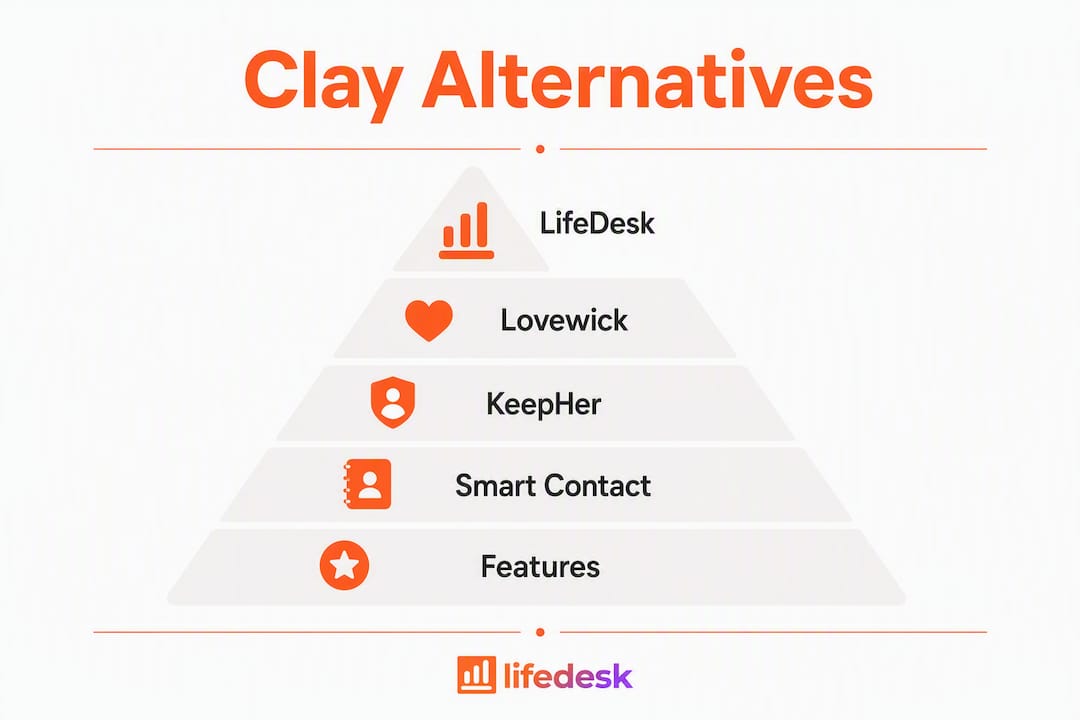
If you want relationship reminders and a full business workflow in one app, LifeDesk is the strongest single pick. It covers contacts, client CRM, finance tracking, tasks, and goals across Web, iOS, and Android, all under one account. For more focused needs, three other apps round out the shortlist:
LifeDesk — All-in-one (relationships + business). Free plan available; Plus and Pro tiers unlock bank connections and AI. Web, iOS, Android.
KeepHer — Romantic relationship tracker with nudges, memory logs, and privacy controls. Mobile-only.
Smart Contact Reminder — Android personal CRM with local-only storage, no account required. One-time purchase option available.
Clay’s credit-based pricing and steep learning curve make it overkill for anyone who just wants to stay in touch with people and manage their work. These four apps deliver faster time-to-value with far less setup.
LifeDesk’s real advantage is breadth without chaos. The relationship tracker handles reminders, notes, and interaction history, while the client CRM manages your freelance pipeline in the same account. Add time tracking, finance tools with real bank connections, and an AI assistant, and you have a genuine single-pane setup for someone juggling personal and professional life. The free plan covers the basics; paid tiers unlock the bank integrations and AI features that make it worth the upgrade.
Lovewick
Lovewick does one thing well: it gives couples a shared digital “cheatsheet” for preferences, gift ideas, and recurring dates. Notes can be private or visible to a partner, which solves the awkward “did you see my reminder?” problem. No business features, no web app. If your only goal is keeping a relationship thoughtful and organized, it gets there fast.
KeepHer
KeepHer goes deeper on the romantic side than Lovewick, with intelligent nudges, a memory-rating system, and last-date tracking. The privacy controls are solid. It’s genuinely built to make remembering feel less like a chore. That said, it’s relationship-only and mobile-only, so it won’t touch your work life.
Smart Contact Reminder
The standout here is privacy. Data lives on your device with no account required, which matters if you’re cautious about uploading contact details to a cloud. The fuzzy reminder system and automatic contact detection are especially useful for neurodivergent users who need low-friction nudges. Android only, and the business-contact support is basic rather than full CRM.
Quick-start steps (20–30 minutes to first value):
Import contacts from your phone or a CSV file.
Set three recurring reminders for your most important relationships.
Connect your calendar so events auto-populate.
Enable two-factor authentication in account settings.
Log one interaction or note immediately so the habit starts today.
Pro Tip:Start with five contacts, not fifty. A small, active list beats a large, ignored one every time.
What kind of support do these apps offer?
LifeDesk provides support through its web platform, with documentation and direct contact options for paid users. Lovewick and KeepHer are smaller indie apps; support is typically email-based with slower response times. Smart Contact Reminder is community-supported through its Google Play listing, with the developer responsive to user feedback in reviews. For anyone who needs reliable, fast support, LifeDesk’s paid tiers are the safest bet.
How flexible are these apps for customization?
LifeDesk leads here. You can configure which life domains appear in your dashboard, set custom reminder schedules, and tailor the client CRM fields to your workflow. Lovewick and KeepHer offer limited customization within their focused scope. Smart Contact Reminder allows custom reminder intervals and contact groupings, which is more flexible than it looks for a free app.
Which apps scale as your needs grow?
LifeDesk scales from a solo free user to a solopreneur on a Pro plan managing clients, finances, and personal goals. The other three apps are intentionally narrow. KeepHer and Lovewick are built for one relationship domain and won’t expand beyond it. Smart Contact Reminder handles a growing contact list well but stays personal-CRM-sized. If you expect your needs to grow beyond relationship reminders, LifeDesk is the only option here that grows with you.
What do users say about these apps?
LifeDesk is positioned as a newer all-in-one platform with a growing user base among freelancers and solopreneurs. Lovewick has positive reception for its simplicity and the shared-visibility feature, which users cite as genuinely useful for couples. KeepHer earns praise for making relationship maintenance feel less mechanical. Smart Contact Reminder has a loyal Android following, particularly among users who prioritize local data storage and dislike subscription models.
LifeDesk covers what no single-purpose app can
Every app on this list solves part of the problem. Lovewick and KeepHer handle relationship reminders beautifully. Smart Contact Reminder nails privacy. But none of them touch your invoices, your client pipeline, or your fitness goals.
LifeDesk puts your relationship reminders, client work, finance tracking, and daily tasks in one account. No switching between four apps. No data scattered across platforms. The free plan is a real starting point, not a teaser. If you’re a freelancer or solopreneur who wants one place for both your personal and professional life, try LifeDesk and see how much cognitive overhead disappears when everything lives together.
FAQ
What is the best Clay alternative for personal relationship reminders?
For relationship-only use, KeepHer and Lovewick are the most focused options. LifeDesk is the better pick if you also need business features alongside relationship reminders.
Does Smart Contact Reminder work on iPhone?
No. Smart Contact Reminder is Android-only. iPhone users should consider LifeDesk or Lovewick, both of which offer iOS apps.
Which of these apps has a free plan?
LifeDesk, Lovewick, KeepHer, and Smart Contact Reminder all offer free access. LifeDesk’s paid tiers unlock bank connections and the AI assistant; Smart Contact Reminder offers a one-time premium purchase rather than a subscription.
Is LifeDesk good for freelancers who also want a stay-in-touch app?
Yes. LifeDesk combines a relationship tracker with a client CRM, time tracking, and finance tools, making it the only option on this list that handles both personal and professional management in one account.
Key Takeaways
For most users who want relationship reminders plus business management, LifeDesk is the only app on this list that handles both without requiring a second tool.
Point
Details
LifeDesk covers both domains
It combines relationship reminders, client CRM, finance, and time tracking in one account.
Focused apps do one thing well
Lovewick and KeepHer are excellent for relationship rituals but offer no business features.
Privacy varies significantly
Smart Contact Reminder stores data locally with no account; LifeDesk uses encrypted cloud storage.
Quick-start matters
Import contacts, set three reminders, and connect your calendar to get value within 30 minutes.
LifeDesk scales with you
It grows from a free personal setup to a full solopreneur platform as your needs expand.