Project and client management work best as two linked systems, not one blurred job. Delivery lives on scope, schedule, and resourcing; the relationship lives on trust, expectations, and retention. Agencies that connect them, with a shared client record and a fixed...
Calendar task integration turns your to-do list into scheduled, time-bound calendar blocks so work actually gets done instead of piling up unseen. The fastest path is either a native tasks layer inside your calendar app or an OAuth-based connector syncing a separate...
Quarterly planning means running your business goals on a 90-day cycle instead of a single annual push, reviewing progress and adjusting course every quarter. The practical version that works best: pick a few measurable priorities, assign a clear owner to each, set...
Most people don’t need one framework. They need three, stacked by time horizon: a long-range direction setter like a BHAG or OGSM, a quarterly execution engine like OKRs, and SMART criteria to keep the resulting key results honest and measurable. Skip the strategic...
The PARA method sorts every file, note, and task you own into four folders (Projects, Areas, Resources, Archives) based on how soon you need to act on it. The main payoff is speed: you stop hunting through nested folders and start finding what you need in seconds,...
The best prioritization frameworks for anyone juggling client work, personal goals, and everything in between are the Eisenhower Matrix, the Pareto principle (80/20), the 1-3-5 Rule, time blocking, and a weekly review. Pick one today: schedule a 90-minute protected...
The fastest way to turn emails into tasks is to use your inbox’s built-in conversion feature (Outlook’s drag-to-Tasks or Gmail’s Tasks panel) for one-off items, and automation rules for anything that repeats. Manual capture works fine at low volume; once the same type...
A hobby project planner is a tool, template, or notebook system that helps you capture ideas and, more importantly, always know your single next physical action. Right now, pick one tool, however basic, and write down the very next step for your current project....
AI agents reclaim your schedule by auto-scheduling tasks, defending focus blocks, and resolving conflicts before you even notice them, but only when you keep human-in-the-loop controls turned on. The strongest results come from task-first tools that unify your to-do...
AI goal planning converts a single sentence of intent, like “I want to get fit” or “I want a promotion,” into a measurable SMART goal with milestones, weekly tasks, and deadlines already attached. Within minutes, you get a concrete plan for the next seven days plus...
Reset Your Week in 15 Minutes: Weekly Review with LifeDesk
A weekly review is a short, scheduled ritual where you clear your inboxes, check your calendar, and pick your priorities before the new week starts. The simplest version takes 15 to 20 minutes: dump loose tasks into one list, scan the next seven days, and write down two or three things that actually matter. Run that once this week and you already have the habit’s core benefit: a Monday that starts with a plan instead of a scramble.
TL;DR:
A weekly review should take 15 to 20 minutes and focus on capturing loose information, updating your system, and setting clear priorities for the week.
Automating or simplifying the process with templates, calendar syncs, and specific time slots increases consistency and reduces the time needed.
Conducting the review on Friday or Sunday affects the accuracy and momentum, with the ideal choice depending on your preference for recall or forward planning.
Shorter templates suitable for routine weeks or busy periods can be as brief as 15 minutes, while chaotic or monthly resets may require up to 90 minutes.
Using a connected, all-in-one app like LifeDesk streamlines setup and helps maintain the habit through recurring tasks, goal integration, and calendar synchronization.
LifeDesk
Bring Your Week Into One View
LifeDesk brings tasks, goals, calendars, and priorities together, helping you structure your personal and professional week in one place.
Your brain is a poor filing cabinet. It keeps nagging you about the dentist appointment you haven’t scheduled and the email you haven’t answered, and that background noise costs you focus all week long. Externalizing those open loops onto paper or into an app is the founding principle behind David Allen’s Getting Things Done (GTD) framework, and it’s the entire reason the weekly review exists. Once a task lives in a system you trust, your mind stops rehearsing it.
The second payoff is direction. Daily task lists tend to drift toward whatever feels urgent, which usually means someone else’s priorities. A weekly review realigns your task list and calendar with your actual goals, so you spend Tuesday afternoon on the project that matters instead of the inbox fire that doesn’t.
Here’s what a consistent review buys you:
Fewer dropped commitments, because “waiting on Sam” lives on a list instead of in your memory
Less context switching, since project status gets updated once instead of relearned daily
A visible pattern of wins and stalls, which makes course correction faster
One weekly decision point instead of dozens of small daily ones
Weekly reviews, in numbers: Automated daily-summary tools can compress a 20-minute review down to roughly five minutes once the data-gathering is automated. Even without automation, the classic version rarely runs longer than a typical hour-long session once you’ve done it a few times.
Choosing the Right Day, Time, and Setup
Friday afternoon and Sunday evening are the two slots almost everyone tries first, and each has a real trade-off. Friday closes the loop while the week is still fresh in your head, which makes recall easier, but you’re often mentally checked out by 4 PM. Sunday gives you a clean mental slate heading into Monday, but you’ll be reconstructing Wednesday’s meetings from memory instead of recent recall. Pick Friday if you value accuracy; pick Sunday if you value momentum going into the new week. A recurring, defended calendar slot matters more than which day you choose.
Match the time budget to your week’s complexity rather than defaulting to one length every time:
15 to 20 minutes for a normal week with no major project shifts
45 to 60 minutes when you’re juggling multiple active projects or a messy inbox
60 to 90 minutes for a monthly deep pass or after a chaotic stretch that needs a full reset
The setup matters more than people expect. Sit somewhere you won’t be interrupted, close every tab that isn’t your task manager or calendar, and set a visible timer. Phone on do not disturb, notifications off, one screen. If you’re doing this on a couch with the TV on, you’re not doing a review. You’re doing a distraction with extra guilt attached.
The Step-by-Step Weekly Review Checklist
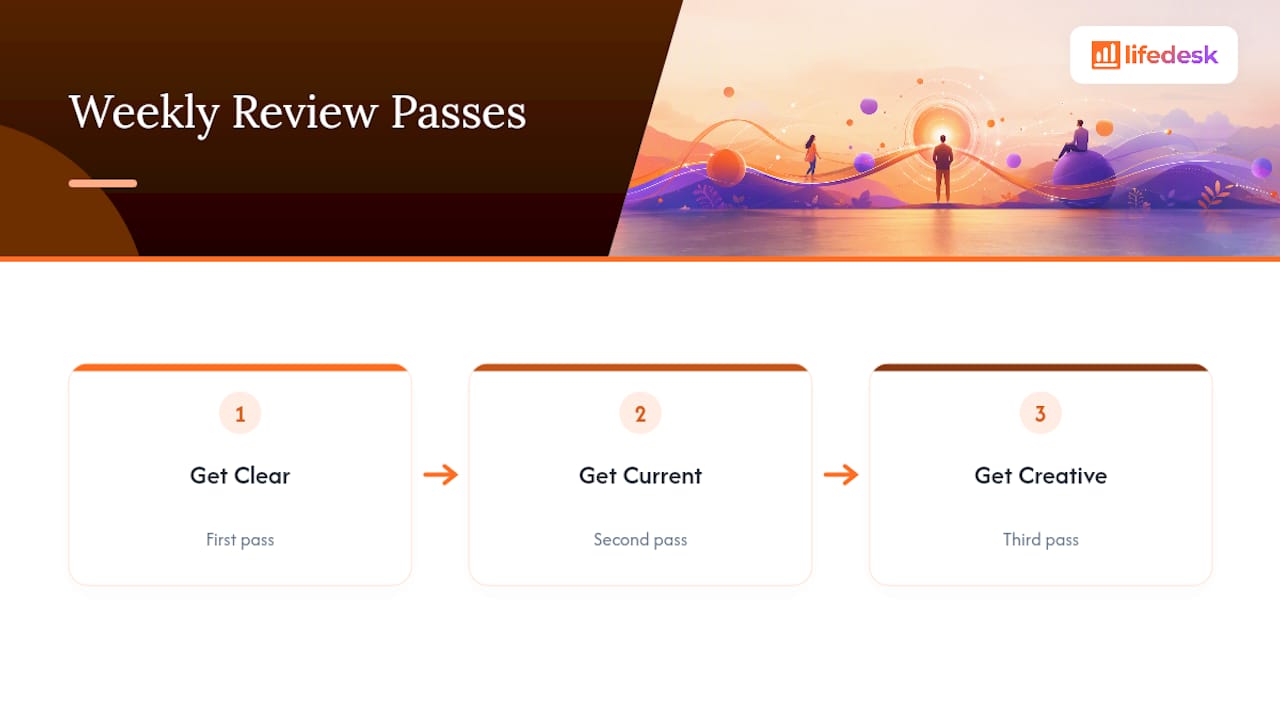
The classic version of this process comes from GTD, which breaks the review into three passes: Get Clear, Get Current, and Get Creative. Each pass has a specific job, and running them in order keeps you from bouncing between “capture mode” and “decision mode,” which is where most people burn time without noticing.
Pass 1: Get Clear
This pass is about emptying every place loose information collects, before you try to organize any of it.
Collect loose papers, sticky notes, and physical clutter into one pile
Empty your email inbox by processing every message to zero, delete, or a task
Empty any notes app, voice memo, or messaging app inbox the same way
Write down anything still rattling around in your head onto your task list
Pass 2: Get Current
Now you update the system itself so it reflects reality instead of last week’s plan.
Review your task lists and mark anything completed, cancel anything no longer relevant
Scan your calendar for the past week, capturing any follow-up actions from meetings or events
Scan your calendar for the next one to three weeks, noting prep work needed for upcoming commitments
Review your active projects one by one and confirm each has at least one clear next action
Check your “waiting for” list, the things you’re blocked on because someone else owes you a reply or a deliverable
Pass 3: Get Creative
The final pass is where you step back and think, rather than just process.
Review your “maybe someday” list for anything that’s become relevant or that you can now cross off
Set two to three priorities for the coming week, the things that would make the week a genuine win
That eleven-step structure is the full GTD checklist in its classic form, and it’s worth learning even if you never run it at full length, because every shorter template you’ll see is a compressed version of these same three passes.
Before you close the review, add a short reflection layer. Three questions work better than a vague “how did it go”:
What worked this week?
What didn’t work?
What will you change next week?
That three-question format forces specificity instead of a generic mental shrug, and naming one win alongside one lesson keeps the review from turning into a self-criticism session. Energy patterns are worth a glance too. If Wednesdays consistently drain you, that’s data, not a coincidence.
Pro Tip:Keep a running note titled “This Week” open all week long and jot down decisions, blockers, and wins the moment they happen. Your Friday review becomes a five-minute edit of that note instead of a from-scratch reconstruction of five days you barely remember.
Three Templates: 15, 20, and 60 Minutes
You don’t need the full eleven-step version every week. Tiago Forte’s approach reframes the weekly review as routine maintenance rather than a comprehensive overhaul, which is exactly the mindset that makes a short version sustainable long term. Pick the template that matches how messy your week actually was.
Template
Time
Core moves
Best for
Sprint
15 min
Empty inboxes, scan next 7 days, pick 2 priorities
Calm, routine weeks
Balanced
20 min
Sprint steps plus one next action per active project, 3-question reflection
Typical working weeks
Full audit
60 to 90 min
All three GTD passes, waiting-for list, someday list, project-by-project deep dive
Monthly reset, chaotic weeks, new quarter
The 15-minute sprint covers the non-negotiables only: dump loose tasks, clear your inbox, glance at the next week’s calendar, and name two priorities. No project-by-project deep dive, no waiting-for list audit.
The 20-minute balanced version adds one next action per active project and the three reflection questions above. This is the template most people should run by default, since it delivers nearly all the benefit of the full review at a fraction of the time.
The 60 to 90 minute full audit is where you run every GTD pass in sequence, including the waiting-for list and someday list nobody wants to touch weekly. Escalate to this version once a month, or any time your 15-minute sprint starts feeling like it’s skipping something important. If your short review keeps surfacing the same nagging item three weeks running, that’s your signal to book the longer session.
Making the Weekly Review a Habit, Not a One-Off
The habit dies the same way every time: you skip one week, tell yourself you’ll double up next time, and never do. A daily 1 to 3 minute debrief, a few lines on what happened and what’s still open, prevents this because it means you’re never reconstructing five days from memory. Daily micro-debriefs materially cut the time your weekly review needs, since the raw material is already captured.
Treat the review slot like a client meeting, not a personal chore you can bump. A recurring calendar invite, blocked and protected, beats a mental note every time. Some people add light accountability: a friend who also does a weekly review and compares notes for five minutes, or a small team that shares wins publicly each Friday. Neither is required, but both raise the odds you’ll show up on a tired week.
Build one rule for the weeks you miss: a shortened 10-minute version beats skipping entirely, and skipping two in a row is the real threshold that kills the habit. Don’t let a missed Friday turn into a missed month.
Capture daily in 1 to 3 minutes so the weekly session has less to reconstruct
Block the slot on your calendar and treat it as fixed, not flexible
Add light accountability if you tend to skip solo habits
Run a shortened version rather than none when the week gets away from you
Pro Tip:If your review keeps running long, that’s usually a sign your system is absorbing work that belongs in a separate slot. Carve out a midweek “catch-up” block for the messy stuff, and let the review stay a review instead of turning into a second workday.
Tools That Make the Process Faster
A weekly review needs four things to work: a place to capture loose tasks, a calendar you actually trust, somewhere to keep project notes, and one inbox you can empty. Scattering those across four separate apps is exactly why most people abandon the habit after a month. Every extra login is a reason to skip the review entirely.
This is where a weekly planning routine built around one connected system beats a pile of disconnected apps. In LifeDesk, you can set up the review in a few concrete steps:
Create a recurring task titled “Weekly Review” with your checklist as sub-tasks, so it regenerates automatically every week
Add a goals checkpoint step that pulls your active goals into the review so priorities stay tied to bigger objectives
Sync your calendar inside the app so the “scan next 7 to 21 days” step happens without switching tools, similar to the workflow described in this calendar and task integration guide
Use daily notes or voice-to-note capture as your micro-debrief input, feeding directly into Friday’s review
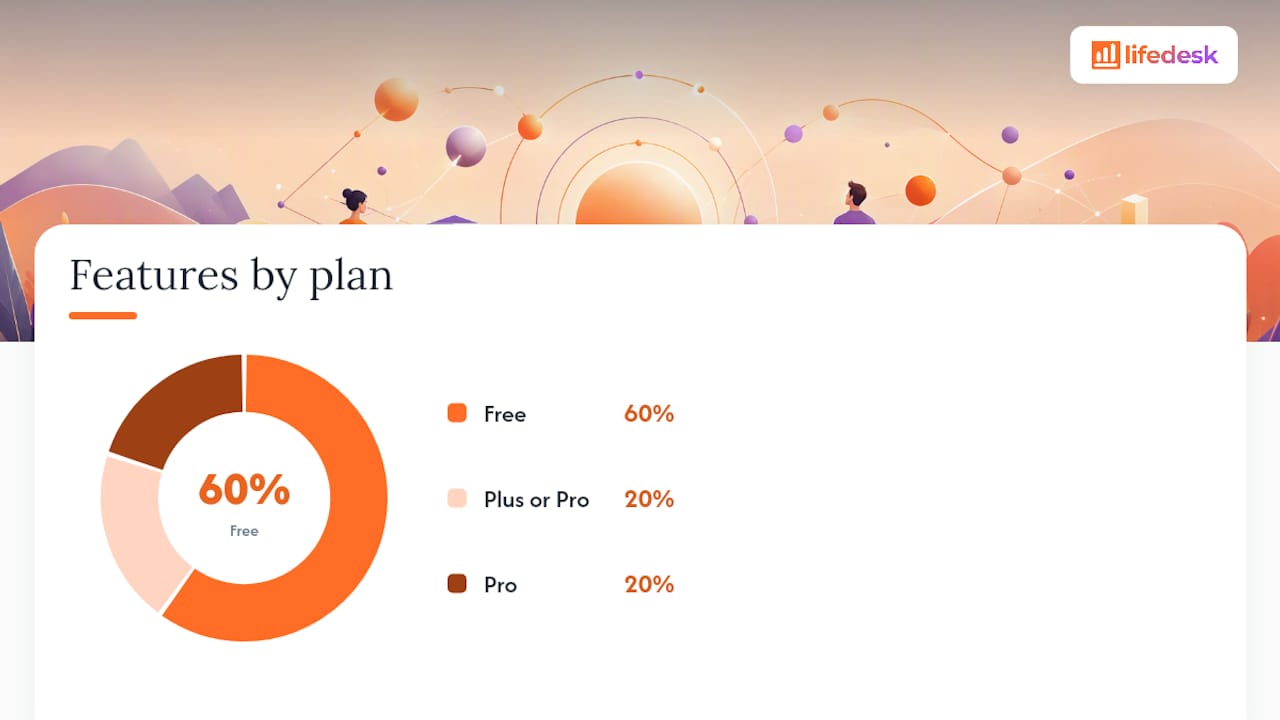
Feature
What it does for your review
Plan needed
Recurring task templates
Auto-generates your checklist every week
Free
Calendar sync
Pulls upcoming events into the review without app-switching
Free
Goal checkpoints
Ties weekly priorities to longer-term goals
Free
Bank account tracking
Adds a financial check-in to the review for freelancers and business owners
Plus or Pro
AI assistant
Summarizes the week’s notes and flags patterns automatically
Pro
The free plan covers a genuinely complete personal weekly review: tasks, calendar, and goals in one place, no cost. If you’re running a business alongside your personal life and want your invoices, client notes, or a real bank connection folded into the same review, that’s when the paid tiers start earning their keep.
Your First Weekly Review Starts This Week
Three moves, in this order: pick your slot and put it on the calendar right now, run the 15 to 20 minute checklist once this Friday or Sunday, and set the recurring reminder before you close this tab. That’s the entire on-ramp.
Keep one rule in your back pocket for the weeks that get chaotic: short and consistent beats perfect and rare, every single time.
Block a recurring 20-minute slot on your calendar today
Run the balanced template (inbox, calendar scan, 2 to 3 priorities) this week
Set a repeating reminder so week two doesn’t depend on your memory
Your first attempt will feel clunky. That’s normal, and it gets faster by the third try, once the steps stop feeling like a checklist and start feeling like a habit.
Set Up Your Weekly Review Inside LifeDesk
LifeDesk gives you one place to run the entire review instead of stitching it together across a task app, a separate calendar, and a notes tool that doesn’t talk to either. Your recurring checklist, calendar, goals, and daily notes all live in the same view, so the Friday session is an edit, not a reconstruction project.
Setup takes about ten minutes. Create a recurring “Weekly Review” task with your checklist as sub-tasks, connect your calendar so the next two weeks show up automatically, and add a goals checkpoint so your priorities stay tied to what actually matters this quarter. The Free plan covers all of that for a personal review at no cost.
If you’re running a business alongside your personal life, paid plans add real bank account tracking and an AI assistant that can summarize your week’s notes and flag patterns before you even sit down. Check the full feature breakdown or head straight to pricing to pick the plan that matches how much of your life you want in one place.
Where This Guide’s Advice Comes From
The step-by-step checklist draws directly from David Allen’s GTD weekly review, the original three-pass structure most modern templates simplify. The short-version philosophy comes from Tiago Forte’s one-touch approach, and the time-boxed templates borrow from practical guides at Smartkeys and Ripple.
The three most useful prompts are: what worked this week, what didn’t work, and what you’ll change next week. Add “what’s still open” and “what are my top 2 to 3 priorities for next week” to turn reflection into a working plan, a format Smartkeys’ template builds around directly.
What Is the Recommended Format for a Weekly Review?
Most guides recommend a three-part structure: clear your inboxes, update your calendar and project list, then set priorities for the week ahead. This mirrors the GTD three-pass model of Get Clear, Get Current, and Get Creative, compressed into whatever time you have, from 15 minutes to a full hour.
What Does “a Week in Review” Mean?
“A week in review” refers to a summary or reflection covering everything that happened in a given week, whether that’s news, personal events, or work progress. In a productivity context, it’s essentially another name for the weekly review ritual: looking back at the week just finished before planning the one ahead.
What Are Some Good Weekly Task Ideas?
Strong weekly tasks include emptying your email and notes inboxes, scanning the next one to three weeks of your calendar, updating each active project with one next action, and reviewing anything you’re waiting on from other people. Close with two to three priorities that would make the coming week feel like a win, a step LifeDesk’s recurring task templates can automate so it regenerates every week without extra setup.